
White-Label Kirana Marketplace Software — Dino Kiranam
White-Label Kirana Marketplace App with Shop, Delivery and Admin Apps
Dino Kiranam is a white-label, quote-first kirana marketplace with Flutter customer, shop and delivery partner apps, a shop web portal, a super admin console and one Node.js backend, where shops price each list and customers approve the total before paying, sold with the source code.
Built for: Kirana & Neighbourhood Grocery Marketplaces, Hyperlocal Delivery Businesses, Local Retail Associations & Cooperatives, Regional Grocery Startups
- Complete Source Code
- Fully Brand-Customizable
- 2-Week Setup Estimate
- Migration Assistance
- 3 Months Support
- Mobile App Included
Complete source code
Frontend, backend, admin dashboard and database schema for the agreed scope — handed to you, not rented.
Fully customizable to your brand
Business name, logo and app icons, Brand colour palette and typography, Your own domain and SSL certificate, Login, email and notification templates and more — applied before handover.
2-Week Setup Estimate
A standard branded deployment is estimated at approximately 2 weeks after the scope, brand assets, hosting access and required service credentials are confirmed. The estimate covers agreed branding, environment setup, supported integration configuration, supplied-data migration, testing and handover. Actual timing depends on product scope, data readiness, client approvals and third-party dependencies. Custom modules and new integrations are quoted separately; the written project schedule governs delivery.
Dino Kiranam is a white-label kirana marketplace from TechDino where a household sends a list, the neighbourhood shop prices each item, and the customer approves before paying. Customer, shop and delivery apps, a shop portal and an admin console share one backend. Complete source code, migration assistance and three months of technical support are included; setup is estimated at approximately two weeks.
What is Dino Kiranam?
- Launch window
- 14 days for a standard branded deployment
- Category
- Ecommerce & Retail Software
- Tenancy model
- Single business (one organisation per deployment)
- Source code
- Included — Commercial License / Software Grant
- Deployment
- Client-Controlled VPS, Hostinger / DigitalOcean / Linode / Hetzner, AWS / Google Cloud / Microsoft Azure, On-Premises Server, Docker Compose
Dino Kiranam is a ready-made, white-label kirana marketplace from TechDino for founders and local operators who want neighbourhood shops online without forcing them into a fixed catalogue. Kirana stock and prices change through the day and many shops have no barcoded catalogue, so the product works the way a kirana already does: the customer asks and the shop answers with what it has right now. A household types a list or photographs a handwritten one, and checks each line the app read. The shop confirms each item, offers a substitute or smaller quantity, or marks it unavailable, against a reply timer. The customer accepts or skips each substitute, the server recalculates the total, and the approved amount is locked and charged once, online or as cash on delivery. The shop packs line by line, one delivery partner at a time receives a timed offer, a pickup code releases the bags, and a delivery code at the door completes the handover with any cash recorded exactly. If an item runs out after payment, the shop cannot change the order alone: the customer chooses to go without it or to cancel. The package has seven parts: a Flutter customer app, a Flutter shop app, a Flutter delivery partner app that queues trip actions when the signal drops, a Next.js shop web portal with fifteen modules, a Next.js super admin console with five role types, a Node.js, TypeScript and MySQL backend with a double-entry journal, and a rebrandable website with the written product, architecture, financial, security and QA documents. The apps work end to end on test data. Before going live the buyer connects an SMS provider, live payment gateway keys and a text-recognition provider, adds legal terms and full Telugu and Hindi text, arranges hosting and has a production security review carried out. TechDino charges no per-order platform fee.
Founders, local retail associations and regional operators that want a branded marketplace for neighbourhood kirana shops, with list-based quotations, shop and delivery apps, the source code and no per-order platform fee.
How can you buy Dino Kiranam?
Dino Kiranam with source code
Dino Kiranam is delivered with the complete source code included in the agreed product scope — frontend, backend, admin dashboard, database schema and any applicable mobile application code. Source-code access, licensing rights and ownership terms are set out in the applicable purchase or licence agreement, so the delivered application can be maintained and extended by your own team.
Source-code access, copyright and licensing rightsSelf-hosted Dino Kiranam
Dino Kiranam runs on hosting you control — your own VPS, cloud account or existing infrastructure — rather than on a vendor platform. Deployment, database setup and migration assistance are included, and there is no mandatory monthly platform fee attached to the software itself. Third-party services such as payment gateways, SMS providers and hosting are billed by those providers directly.
Self-hosted deployment optionsWhite-label Dino Kiranam
Dino Kiranam can use your name, logo, colour scheme, domain and applicable templates; app-store assets apply where a mobile application is in scope. A standard branded deployment is estimated in approximately 2 weeks after scope and required assets are confirmed, subject to client approvals, data readiness, third-party dependencies and the written schedule.
What white-label customization coversDino Kiranam for agencies and resellers
Agencies, studios and IT partners can take Dino Kiranam to their own clients under their own brand. Licensing terms for reselling, the number of deployments permitted and any ongoing support arrangement are defined in the applicable agreement before the engagement starts.
Reseller and partner arrangementsApplications Included
Dino Kiranam is delivered as the 8 applications below. Each one is part of the purchase scope.
- Shop owners answering requests and managing stock from a phone01
Shop App (Android & iOS)
- Quote inbox and per-item quote builder
- Line-by-line packing
- Pickup and collection code checks
- Editable stock, price, MRP and low-stock alerts
- Sign-up wizard and KYC documents
- Your visitors, and the people who extend the product02
Website & Documents
- Rebrandable public website
- Interactive example quotation
- Product requirements and business rules
- Architecture, database, API and security documents
- QA plan and traceability matrix
- Customer app on Android and iOS03
Mobile Application
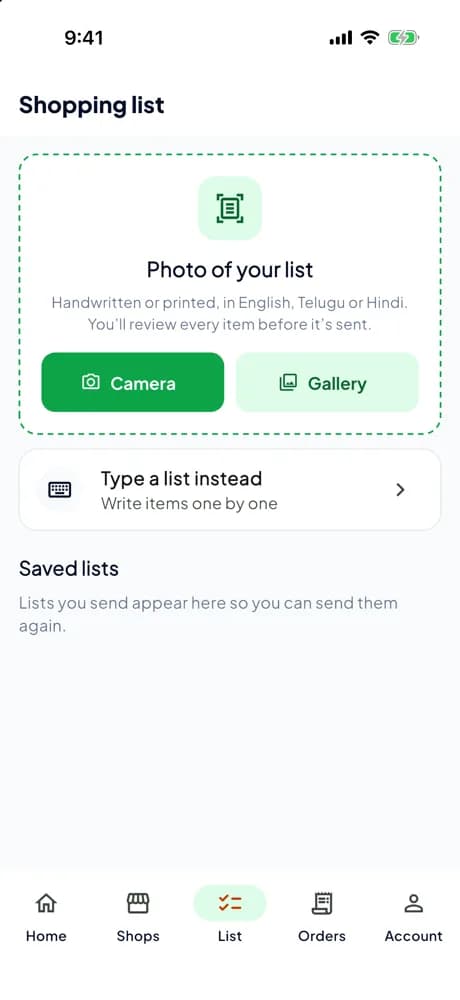
- Type a list or photograph a handwritten one
- Review each line the app read before sending
- Get line-by-line prices from a nearby kirana
- Accept or skip each substitute and see the total recalculated
- Native build for Android and iOS
- The business owner and back-office team04
Admin Dashboard
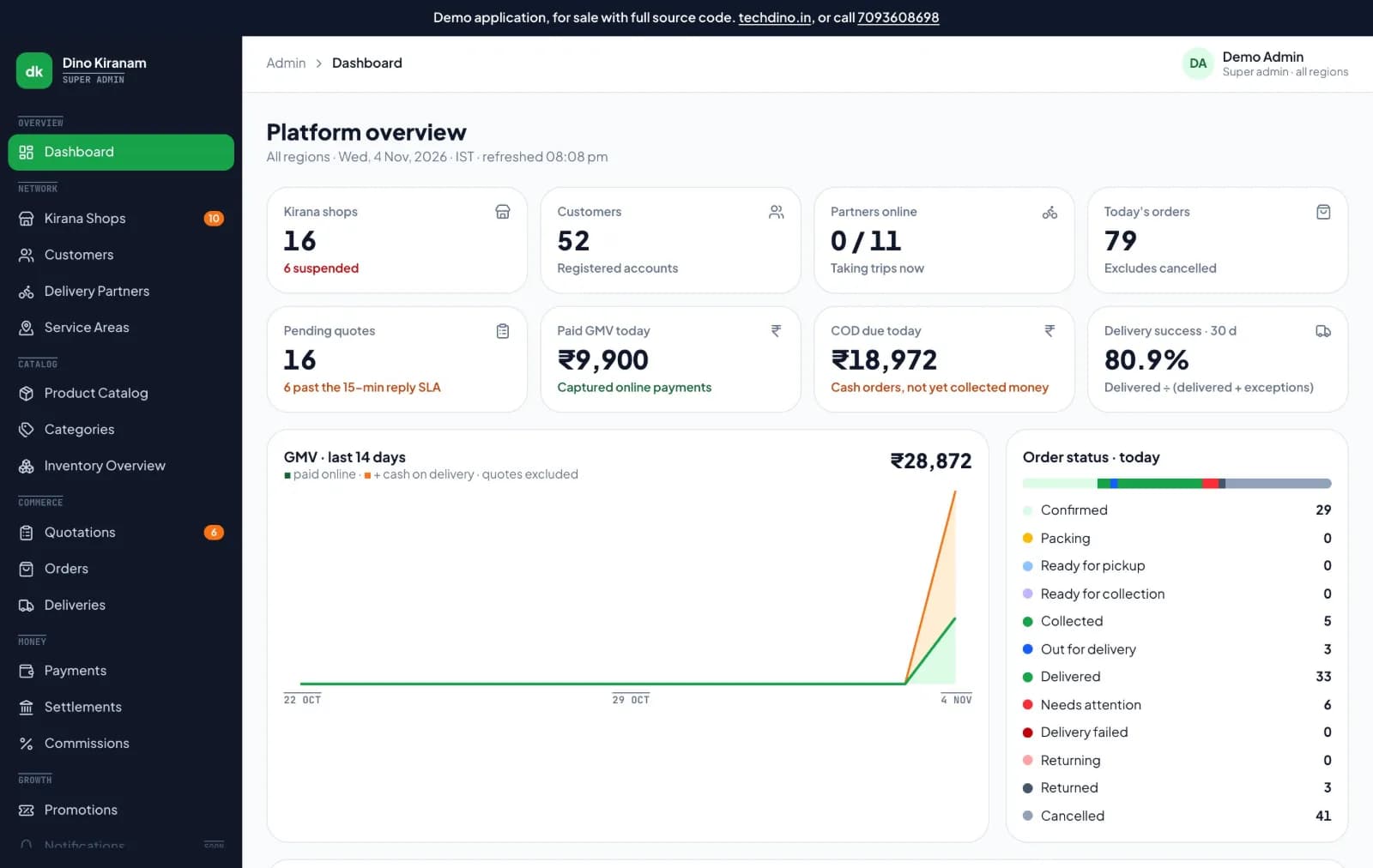
- Platform overview with shops, orders, pending quotes, GMV and cash due
- Shop and delivery partner KYC review, suspension and COD policy
- Service areas and hours with simulation
- Quotations, orders, dispatch queue and delivery exceptions
- Master catalogue, categories and inventory across shops
- Payments, refunds, settlements, payouts and commission
- Delivery partners and field agents05
Delivery / Service Agent Application
- Delivery partner: review the fare and any cash to collect, then accept or decline a timed offer
- Delivery partner: collect with the pickup code, deliver with the customer's code and record the exact cash
- Delivery partner: deposit cash held and receive payouts with any remaining cash deducted first
- Kirana shop owners, managers and packers06
Shop Web Portal
- Shop merchant: answer each request before the reply timer ends, confirming items, offering substitutes or marking them unavailable
- Shop merchant: pack line by line against the approved order and report anything that cannot be supplied
- Shop merchant: check the partner's pickup code, or the customer's collection code for pickup orders
- The applications above, and any system you integrate later07
Backend REST API
- REST endpoints used by the web and admin applications
- Authentication and session handling
- Role and permission checks
- Endpoints for the integrations configured during setup
- Your server or managed database instance08
Database
- Database schema for every module listed above
- Migration files used during setup
- Reference data required for first run
Branding and setup plan for Dino Kiranam
A standard branded deployment is estimated at approximately 2 weeks after the scope, brand assets, hosting access and required service credentials are confirmed. The estimate covers agreed branding, environment setup, supported integration configuration, supplied-data migration, testing and handover. Actual timing depends on product scope, data readiness, client approvals and third-party dependencies. Custom modules and new integrations are quoted separately; the written project schedule governs delivery.
- Day 1–2
1. Requirements and brand assets
Scope confirmation, logo, colour palette, domain, company details and the integration credentials you want configured.
- Day 3–6
2. White-label branding applied
Brand identity, theme colours, typography, app icons, email and notification templates applied across every included interface.
- Day 7–10
3. Deployment and integrations
Server or cloud deployment, domain and SSL, database setup, payment gateway, SMS, email and maps configuration.
- Day 11–14
4. Migration, testing and handover
Migration of supplied data, walkthrough testing, source-code handover, documentation and admin training. Three months of technical support starts here.
Who can use Dino Kiranam?
- Founders launching a neighbourhood grocery marketplace
- Local operators bringing a town's or suburb's kirana shops online
- Retail associations and cooperatives serving member shops
- Hyperlocal delivery businesses adding grocery orders
- Regional startups serving shops without a barcoded catalogue
Problems Dino Kiranam solves
Online catalogues that go stale
kirana prices and stock move through the day, so the shop prices each list with what it has right now.
Surprise substitutes
another brand or pack only enters the order if the customer accepts it, and skipping it recalculates the total.
Bills that change after ordering
items, discount and delivery are totalled by the server, and that exact approved amount is what the customer pays.
Handwritten lists that need retyping
photograph the list and check each line, with uncertain lines confirmed before sending.
Shortages after payment
the shop cannot change a paid order alone, so the customer chooses to go without the item or to cancel.
Cash that never reconciles
delivery partners record the exact amount per trip, and cash still held comes off the next payout first.
Doors and phone numbers exposed
shops see only the area, partners see the address only after accepting, and both see the last four phone digits.
Application Features
Every module below ships pre-built and is configurable during white-label setup.
Customer App: Finding a Shop
Home, shop list and shop storefront with categories, shops filtered to those serving the saved address, a clear message and address change when an area is not served, and delivery or pickup where the shop offers it.
Customer App: Making a List
Type a list by hand or photograph one with the camera or gallery. Crop, rotate and reorder pages, review each line the app read with its confidence shown, confirm uncertain lines before sending, and keep saved lists for repeat shopping.
Customer App: Deciding on a Quote
Line-by-line prices from the shop, accept or skip each substitute with the total recalculated, ask the shop for changes or reject the quote, and see every revision and its time limit.
Customer App: Paying & Receiving
Online payment or cash on delivery, a saved address picker, live order tracking, a delivery code at the door or a collection code for pickup, and a choice of what happens when a shop runs short after payment.
Customer App: After the Order
Cancel before packing with refund status, rate the order, report a problem with a photo, reorder a past delivery, and manage name, addresses, saved lists and language.
Shop App: Approval & Daily Work
A sign-up wizard for owner, shop, delivery and hours, KYC documents from camera or gallery, under-review, fix-and-resubmit and rejected screens, a dashboard with an open or closed switch, a quote inbox and a per-item quote builder with substitutes and partial quantities. It blocks quotes a customer could never approve and gives the reason.
Shop App: Packing, Handover & Stock
Orders with line-by-line packing, reporting an item you cannot supply, pickup and collection code checks, editable stock with plus, minus and a reason, price, MRP and low-stock alerts, show or hide an item, stock movement history and adding a product.
Shop Web Portal: Selling & Fulfilment
Fifteen modules with separate logins and permissions. A dashboard with waiting requests and reply timers, a quote builder with substitutes and revisions, shop-funded offers and coupons, customers with masked phone numbers, orders with a packing checklist, and pickup, collection and return handover codes.
Shop Web Portal: Catalogue & Stock
Products with bulk price editing and master-catalogue match, CSV import with a dry-run preview, inventory on hand, reserved and free, reasoned adjustments with a movement timeline and CSV export, and categories in the order customers see them.
Shop Web Portal: Money & Running the Shop
Per-order earnings with commission shown, settlements with UTR and failure tracking, sales reports with CSV export, hours, holidays, delivery and pickup settings, bank details, staff roles with a permissions matrix, support tickets, activity logs and multiple shops under one owner.
Delivery Partner App: Joining & Trips
Sign-up with selfie, zone and vehicle, licence, RC and insurance with expiry dates plus Aadhaar, an online and offline switch, offers with a server-timed countdown, decline reasons and four steps: to shop, pickup code, to customer, delivery code.
Delivery Partner App: Exceptions & Offline
Report a damaged bag, vehicle issue, wrong address or refused order, a customer-unreachable flow with a wait timer and logged calls, a guided return to the shop, and actions that queue offline as Pending sync until the server confirms.
Delivery Partner App: Money
Exact cash or UPI collection recorded per trip, earnings and cash held, recorded cash deposits, bank details and payout history, and a profile with documents.
Admin Console: Network
Shops and delivery partners with pending KYC queues, a review drawer with private documents and a checklist to approve, ask to fix or reject, suspend and reinstate with COD policy per shop, customers with masked phone numbers, and service areas and hours with simulation.
Admin Console: Commerce & Catalogue
Quotations with reply-time tracking, orders with cancel, partial refund and back to packing, a dispatch queue with live offers and manual assign or reassign, delivery exceptions and returns, master products and variants, categories in English, Telugu and Hindi, and inventory across shops.
Admin Console: Money
Payments, refunds, gateway events and the journal, shop settlement cycles to calculate, approve, record UTR and retry, partner payouts with cash deducted first, bank verification, cash deposits with the bank-received amount, effective-dated commission per shop and platform promotions with a budget and pause.
Admin Console: Control
Email and password sign-in with lockout, super, operations, finance, catalogue and support roles, region-limited accounts, two-step verification for sensitive actions, second-admin approval for large refunds and policy, session list and revocation, audit logs, a support desk, reports with CSV exports and versioned settings by region.
Backend: Ordering
Versioned quotes with expiry, revisions and server-calculated totals, delivery-area checks, delivery and pickup orders, stock reservation with an append-only ledger and shortage handling with customer consent. Prices, stock and payments are decided on the server, never on a phone.
Backend: Payments & Ledger
Razorpay integration and a signed sandbox gateway, one charge per approval even on retries, refunds capped at the amount paid, a balanced double-entry journal, and commission, settlements and partner payouts. An order is confirmed only after a signed message from the payment provider.
Backend: Delivery
Server-owned dispatch with timed offers, one holder per order enforced by the database, pickup and delivery codes with attempt limits, COD custody and deposits, and idempotent replay of offline trip actions.
Backend: Security & Engineering
Revocable sessions with rotating refresh tokens, a capability table on every admin route denied by default, encrypted TOTP secrets, private uploads with type checks and scoped access, an audit trail, Prisma schema and migrations, automated unit and end-to-end tests, Docker Compose layouts, readiness checks, graceful shutdown, a separate worker and a CI workflow.
Website & Documents
A rebrandable marketing site with an interactive example quotation, plus product requirements and business rules, UX specifications for every surface, architecture, database, API and state machine documents, financial ledger and security design, a QA plan with a traceability matrix, and agent handoff and readiness reviews.
Admin panel capabilities
- Platform overview with shops, orders, pending quotes, GMV and cash due
- Shop and delivery partner KYC review, suspension and COD policy
- Service areas and hours with simulation
- Quotations, orders, dispatch queue and delivery exceptions
- Master catalogue, categories and inventory across shops
- Payments, refunds, settlements, payouts and commission
- Five admin role types, region-limited accounts and two-step verification
- Second-admin approval, audit logs, support desk and versioned settings
Customer app
- Type a list or photograph a handwritten one
- Review each line the app read before sending
- Get line-by-line prices from a nearby kirana
- Accept or skip each substitute and see the total recalculated
- Pay online or by cash on delivery
- Track the order and hand over with a delivery code
- Cancel before packing, with refund status
- Keep saved lists and reorder a past delivery
Dino Kiranam screenshots
Click any image for a full-resolution preview.
Admin Overview — Shops, quotes, GMV and cash due
adminAdmin Overview — Shops, quotes, GMV and cash due
Quote Builder — Price each line before the reply timer ends
adminQuote Builder — Price each line before the reply timer ends
Customer App — Photograph a list or type one
adminCustomer App — Photograph a list or type one
Shop App — Quotes, packing and stock from a phone
adminShop App — Quotes, packing and stock from a phone
Delivery Partner App — Offer, pickup code and handover
adminDelivery Partner App — Offer, pickup code and handover
Shop Orders — Packing checklist and handover codes
adminShop Orders — Packing checklist and handover codes
Products — Your own prices and bulk editing
adminProducts — Your own prices and bulk editing
Inventory — On hand, reserved and free
adminInventory — On hand, reserved and free
Earnings — Per-order amounts with commission shown
adminEarnings — Per-order amounts with commission shown
Settlements — Each payout with its bank reference
adminSettlements — Each payout with its bank reference
Staff — Roles and a permissions matrix
adminStaff — Roles and a permissions matrix
Deliveries — Assignment queue and exceptions
adminDeliveries — Assignment queue and exceptions
Admin Settlements — Calculate, approve and record UTR
adminAdmin Settlements — Calculate, approve and record UTR
Users & Roles — Role-limited admin access
adminUsers & Roles — Role-limited admin access
How the Application Works
End-to-end workflow across Customer, Shop Owner, Shop Manager, Packer, Delivery Partner, Super Admin, Operations, Finance, Catalogue, Support.
Buy: get the complete source code from TechDino
Step 1Brand: set your marketplace name, logo, colours and domain
Step 2Connect: add live payment, SMS and text-recognition accounts, hosting and your legal terms
Step 3Launch: complete a production security review, onboard shops and partners, then publish the apps under your brand
Step 4Dino Kiranam roles, modules and integrations
User roles
Customer, Shop Owner, Shop Manager, Packer, Delivery Partner, Super Admin, Operations, Finance, Catalogue, Support
Modules
Customer App: Shop Discovery, Typed & Photographed Lists, Line-by-Line Quotations with Substitutes & Revisions, Online Payment & Cash on Delivery, Live Order Tracking with Delivery & Collection Codes, Shop App: Quote Inbox, Packing, Handover & Stock, Shop Web Portal: Fifteen Back-Office Modules, Products, Bulk Price Editing, CSV Import & Inventory, Shop Offers, Earnings, Settlements & Sales Reports, Staff Roles, Permissions Matrix & Activity Logs, Delivery Partner App: KYC, Timed Offers & Four-Step Trips, Offline Trip Actions with Pending Sync, Exact Cash & UPI Collection, Deposits & Payouts, Shop & Partner KYC Review Queues, Service Areas, Hours & Simulation, Dispatch Queue, Manual Assign & Delivery Exceptions, Master Catalogue & Categories in English, Telugu & Hindi, Payments, Refunds, Gateway Events & Journal, Settlement Cycles, Effective-Dated Commission & Promotions, Admin Roles, Two-Step Verification & Audit Logs, Stock Reservation on an Append-Only Ledger
Integrations
Razorpay payments (your account), SMS provider for login codes (your account), Text-recognition provider for photographed lists (your account)
Reports
Platform overview: shops, customers, partners online, orders, pending quotes, paid GMV and cash due, Quotation reply-time tracking across shops, Shop sales reports with CSV export, Per-order earnings with commission shown, Settlements with UTR and failure tracking, Inventory on hand, reserved and free, with movement timeline and CSV export, Delivery exceptions and returns, Audit logs and activity logs of every change
Integration scope
- Razorpay Payments (your account) · configuration
- Signed Sandbox Payment Gateway · built in
- SMS Provider for Login Codes (your account) · configuration
- Text-Recognition Provider for Photographed Lists (your account) · configuration
- Other Payment Gateways · custom
Customer
- Send a typed or photographed list to a nearby kirana
- Accept or skip substitutes and approve the total
- Pay, track the order and share the delivery code at the door
Shop Owner / Manager
- Answer requests with today's prices and stock
- Manage products, inventory, offers and staff
- Review earnings, settlements and sales reports
Packer
- Pack each order line by line
- Report an item that cannot be supplied
- Hand over against the pickup code, without seeing bank details
Delivery Partner
- Complete KYC and go online
- Accept or decline an offer after seeing the fare
- Collect with the pickup code, deliver with the customer's code and record cash
Operations
- Review shop and partner documents
- Run the dispatch queue and delivery exceptions
- Set service areas and hours
Finance
- Approve settlements and record the UTR
- Run partner payouts with cash deducted first
- Approve large refunds with a second admin
Catalogue
- Maintain master products and variants
- Manage categories in English, Telugu and Hindi
Support
- Answer tickets on the support desk
- Work within role-limited access, with sensitive actions recorded
What You Receive
- Source code for the Flutter customer, shop and delivery partner apps
- Source code for the Next.js shop web portal, admin console and website
- Source code for the Node.js backend, worker and MySQL schema
- Automated unit and end-to-end tests and a CI workflow
- Product, UX, architecture, financial, security and QA documents
- Three months of technical support
- Complete source code for the applications and modules in the agreed purchase scope
- Frontend application source code
- Backend API source code
- Admin dashboard source code
- Database schema and migration files
- Mobile application source code (Android and iOS)
- Application setup documentation
- Environment configuration guidance
- White-label branding support
- Basic deployment assistance
- Server and database migration assistance
- 3 months of technical support
After purchase, you receive the complete source code for the agreed project scope. Branding, basic setup, deployment and migration assistance are included as agreed. A standard branded setup is estimated at approximately 2 weeks after required assets and access are confirmed, subject to the written schedule and third-party dependencies. Three months of technical support starts on the confirmed delivery date.
Deployment and Migration Support
TechDino provides basic migration and deployment assistance to help move the application to the customer's server, VPS, cloud hosting or supported hosting environment. This includes environment setup guidance, database migration, application build guidance and basic deployment verification.
What migration support does not cover
- Hosting fees are not included
- Domain charges are not included
- Paid third-party APIs are not included
- SMS, email, maps and payment-gateway charges are not included
- Major server architecture changes are quoted separately
- New features and large customizations are not included in migration support
Three Months Technical Support Included
Every TechDino project includes three months of technical support from the confirmed delivery date. This support covers installation guidance, deployment-related assistance, configuration help, clarification of the existing codebase and correction of verified issues within the delivered project scope.
Support includes
- Installation guidance
- Environment configuration help
- Deployment clarification
- Database migration clarification
- Existing-feature usage guidance
- Verified bug fixes within the delivered scope
- Basic codebase clarification
- Build and release guidance
Support does not include
- New modules
- New business workflows
- Major UI redesigns
- Third-party service fees
- New third-party integrations
- Infrastructure or hosting costs
- Continuous server administration
- Changes outside the original agreed scope
Additional development, custom features and support after the included three-month period can be provided under a separate support or development agreement.
Source Code and Customization
The customer receives the complete source code included in the agreed product scope. The application can be deployed under the customer's brand, domain and hosting environment. The customer can maintain, extend and customize the delivered application according to the applicable purchase or licence agreement.
Scope for Dino Kiranam: Applicable source code for the Flutter customer, shop and delivery partner apps, the Next.js shop web portal, super admin console and website, the Node.js and TypeScript backend with its worker, Prisma schema and migrations, automated tests, Docker Compose layouts, the CI workflow and the written specifications. Licence type: Commercial License / Software Grant.
Usage, copyright and resale termsDino Kiranam by market
Dino Kiranam is client-hosted, so each deployment can be scoped around the buyer's currency, timezone, payment providers, data-hosting preference and local integration requirements. These market notes describe planning considerations, not a local office or completed client claim.
- India & HyderabadBuilt around how Indian kirana shops work: rupee quotations, Razorpay payments, UPI or cash at the door, UTR-tracked settlements to shop bank accounts, and master categories in English, Telugu and Hindi. Shops submit a shop licence, shopfront photo, Aadhaar and PAN; partners submit a licence, RC, insurance and Aadhaar. Full Telugu and Hindi text is added at setup. Confirm GST, food-safety, Legal Metrology and DPDP Act obligations with your advisers before launch.Review market requirements
- UAE & GulfFor neighbourhood baqala groceries in Dubai, Sharjah, Riyadh and Doha, the list-and-reply flow suits shops already taking orders by phone. Local currency, service areas and identity documents are configured or scoped at setup, Gulf card gateways need a custom integration, and Arabic text is scoped separately. Confirm municipal food-trade and delivery rules locally.Review market requirements
- Southeast AsiaFor sundry shops, warungs and sari-sari stores in Malaysia, Indonesia and the Philippines, shop-set prices and exact cash recording suit small stores without barcoded catalogues. Local wallets such as GrabPay, GoPay, GCash or FPX need a custom integration, and local languages are scoped separately.Review market requirements
- AfricaFor neighbourhood provision shops and dukas in Lagos, Nairobi and Accra, typed or photographed lists, shop-set prices and recorded cash on delivery support markets where cash remains common. Mobile money and gateways such as M-Pesa, Paystack or Flutterwave need a custom integration.Review market requirements
Technology and Architecture
Technology stack
- Backend: Node.js and TypeScript with a separate worker
- Database: MySQL with Prisma schema and migrations
- Shop web portal, admin console and website: Next.js
- Customer, shop and delivery partner apps: Flutter for Android and iOS
- Payments: Razorpay integration and a signed sandbox gateway
- Deployment: Docker Compose on a server you control, with a CI workflow
Deployment options
- Client-Controlled VPS
- Hostinger / DigitalOcean / Linode / Hetzner
- AWS / Google Cloud / Microsoft Azure
- On-Premises Server
- Docker Compose
Data migration covered
- Loading of the shops, products and service areas you supply, as agreed in scope
- Payment, SMS and text-recognition provider setup
- Docker deployment on your own server
Dino Kiranam is fully customizable to your brand
Nothing ships carrying the TechDino name. Every surface a customer or staff member sees is rebranded to your business before handover, and because the source code is yours, your own team can change anything afterwards.
- Business name, logo and app icons
- Brand colour palette and typography
- Your own domain and SSL certificate
- Login, email and notification templates
- Invoice, receipt and report branding
- App-store listing assets under your developer account
- Content, labels and terminology for your market
- Currency, timezone, tax and language settings
White-label options specific to Dino Kiranam
- Your marketplace name, logo, colours and app icons
- Your own domain for the website, shop portal and admin console
- Customer, shop and partner apps published under your Google Play and App Store accounts
- Website content and your own legal terms
- Your marketplace name, logo, colours and app icons
- Your domain for the website, shop portal and admin console
- Customer, shop and delivery partner apps published under your developer accounts
- Service areas, commission rates, fares and payout cycle
- Full Telugu and Hindi text, and other languages, as scoped
- Additional features built to your process
Transform Dino Kiranam into Your Brand
Toggle between our base demo branding and a customized client launch build.
Theme Colors
Custom Corporate Palette
Domain & SSL
Client Custom Domain
App Stores
Published Under Your Account
What business owners get
- No per-order platform fee from TechDino; you set commission, fares and the payout cycle
- Source code for all three apps, both portals, the backend and the website
- Your brand on the apps, portals and website
- Exact money handling: server-calculated totals and a balanced double-entry journal
- Customer, shop and partner data stay on servers you control
How TechDino Compares to Alternative Software Delivery Models
Evaluating ready-made software against custom development from scratch or recurring monthly SaaS subscriptions.
Ready-Made Dino Kiranam
- Timeline: 2-Week Setup Estimate; final schedule confirmed after scope review
- Pricing: One-time quotation per agreed scope
- Code Access: Full source-code handover included
- Hosting: Self-hosted on client VPS (Hostinger, AWS, DigitalOcean)
- Software Fees: 0 recurring platform fees
Development From Scratch
- Timeline: Onboarding varies by vendor and scope
- Pricing: Agency quotes vary with scope; compare the written quotation you receive
- Code Access: Handed over upon project sign-off
- Hosting: Cloud infrastructure setup
- Risks: Scope changes, milestone delays, untested edge cases
Rental Subscriptions
- Timeline: Onboarding varies by vendor and scope
- Pricing: Compare actual subscription and usage charges
- Code Access: Check the vendor’s source and export terms
- Hosting: Check available hosting and residency options
- Customization: Compare supported extensions and APIs
Global Deployment, Currency & Invoicing Support
Delivery is coordinated remotely from Hyderabad. Currency, language, hosting and payment requirements are reviewed against this product’s included scope.
Scope INR billing, tax fields, gateway credentials and India hosting requirements for this product. Only the integrations listed in the agreed scope are included.
India Market DetailsReview USD/CAD billing, payment-provider eligibility and your preferred hosting country. Gateway and infrastructure choices depend on the product and agreed scope.
USA Market DetailsConfirm AED/SAR billing, language requirements, supported gateways and the exact hosting country. Arabic interfaces and new integrations are separately scoped where not included.
UAE Market DetailsReview GBP/EUR billing, payment providers, export needs and the required hosting country. Hosting alone does not establish regulatory compliance.
UK Market DetailsConfirm AUD/SGD billing, gateway availability and your required hosting country. Payment and deployment options are reviewed for the actual application.
Australia Market DetailsExplore target markets and discuss payment, tax, timezone and hosting requirements for your deployment.
Dino Kiranam frequently asked questions
What is Dino Kiranam?
Dino Kiranam is a white-label kirana marketplace from TechDino. A household sends a typed or photographed list, a nearby shop prices each item, and the customer approves the total before paying. It includes customer, shop and delivery partner apps, a shop web portal and an admin console, sold with the source code.
Which apps are included in Dino Kiranam?
Seven parts: Flutter customer, shop and delivery partner apps for Android and iOS, a Next.js shop web portal with fifteen modules, a Next.js super admin console, a Node.js, TypeScript and MySQL backend, and a rebrandable website with the written product, architecture, financial, security and QA documents.
How does quote-first grocery ordering work?
The customer sends a list, and the shop confirms each item, offers a substitute or smaller quantity, or marks it unavailable. The customer accepts or skips each substitute and approves the server-calculated total. That approved amount is what is charged, and the shop packs against it line by line.
Why not show a fixed online catalogue with prices?
Kirana stock and prices change through the day, and many small shops have no barcoded catalogue. Asking the shop means the price the customer sees is one the shop can honour. Shops can still start small, add stock as they go or import a CSV file.
Can customers order by photographing a handwritten list?
Yes. The customer photographs a list with the camera or gallery, crops, rotates and reorders pages, and reviews each line the app read, with confidence shown. Uncertain lines must be confirmed before sending. This needs a text-recognition provider connected by the buyer, and typing a list always works.
What happens if a shop runs out after the customer has paid?
The shop reports the item while packing and cannot change the order alone. The customer chooses to go without the item and get its value back, or to cancel. Paid orders cancelled before packing are refunded to the original method, and a refund can never exceed the amount paid.
How do delivery and cash handling work?
One free partner at a time gets a timed offer showing the fare, shop, drop area and any cash to collect. A pickup code releases the bags and the customer's code completes delivery. Exact cash is recorded per trip, and cash a partner still holds comes off the next payout first.
Does the delivery partner app work without a signal?
Yes. Trip actions queue on the phone, marked Pending sync, and send when the connection returns. The server replays them safely, so a repeated action is not applied twice.
How is customer information protected?
Shops see the area and PIN code, not the door, and the partner sees the full address only after accepting the trip. Shops and partners see only the last four digits of a phone number. Shop and partner documents stay in private storage, and reads are logged.
Can I try the Dino Kiranam demo?
Yes. The demo at dinokiranam.techdino.in offers Android APKs for the customer, shop and delivery partner apps with quick-login buttons on the sign-in screen. It runs on test data and a sandbox gateway and takes no real orders, so never enter real details. Ask TechDino for a portal walkthrough.
Is Dino Kiranam ready to launch as it is?
The apps work end to end on test data. Before going live you connect an SMS provider, live payment gateway keys and a text-recognition provider, add your legal terms and full Telugu and Hindi text, arrange hosting and have a production security review carried out.
How much does Dino Kiranam cost, and is there a per-order fee?
Price depends on branding, app-store submissions, integrations and data loading in scope, so a one-time written quotation follows a demo walkthrough. TechDino charges no per-order or monthly platform fee. You set shop commission, fares and the payout cycle; hosting, SMS and gateway fees go to those providers.
How long does it take to launch Dino Kiranam?
A standard branded deployment is estimated at approximately two weeks after the scope, brand assets, hosting access and provider accounts are confirmed. Google Play and App Store reviews and the production security review run on their own timelines, so plan the public launch after them.
Is the source code included, and what does the license allow?
Yes. All three Flutter apps, both Next.js portals, the backend and worker, database migrations, automated tests, the website and the written documents are handed over. The commercial license covers use, modification and deployment for your own marketplace; running it for other businesses needs a reseller arrangement.
Which languages does Dino Kiranam support?
The interface runs in English, master categories can be kept in English, Telugu and Hindi, and photographed lists are read in those three languages through the connected text-recognition provider. Full Telugu and Hindi interface text is added at setup, and other languages are scoped separately.
What does Dino Kiranam not include?
Shops, delivery partners, hosting, payment gateway, SMS and text-recognition accounts, Google Play and App Store developer accounts, legal terms and the production security review are not included. GST, food-safety, Legal Metrology and privacy-law compliance stay with the operator and their advisers.
Is migration support included?
Yes. Basic setup, deployment and database migration assistance is included for moving the application to a supported hosting environment.
How much technical support is included?
Three months of technical support is included from the confirmed project delivery date.
Can the application use my branding?
Yes. The application is fully customizable under your brand. Branding covers business name, logo and app icons, brand colour palette and typography, your own domain and ssl certificate, login, email and notification templates, invoice, receipt and report branding, app-store listing assets under your developer account, content, labels and terminology for your market, currency, timezone, tax and language settings. Because you also receive the source code, any branding element not covered during setup can be changed by your own team afterwards.
Are hosting and third-party charges included?
No. Hosting, domain registration, SMS, email, maps, payment gateways and other paid third-party services are separate.
Can I request new features?
Yes. New features and major customizations can be developed under a separate quotation based on the required scope.
Is a mobile application included?
Yes. Dino Kiranam includes Android and iOS mobile application source code in its package. The "Applications Included" section lists the exact scope.
Related products and resources
FreshCart
FreshCart Grocery Delivery & Quick-Commerce Software
View productDino Food Delivery
White-Label Food Delivery App with Restaurant, Rider and Admin Apps
View productDino Milk
Dino Milk Daily Milk & Dairy Delivery Subscription Software
View productRetailDino SaaS
White-Label Retail POS & Inventory SaaS Platform with Complete Source Code
View productGuides for Dino Kiranam
White-Label Kirana Marketplace App: How Quote-First Grocery Ordering Works
Examine how Dino Kiranam replaces stale grocery catalogs with a quote-first kirana marketplace workflow: photographed lists, line-by-line shop pricing, customer substitute approval, OTP handovers, and double-entry ledger settlements.
Read the guideHow Source-Code Licensing Works for Ready-Made Software
What buying software 'with source code' actually means: license types, what you can and cannot do, deployment rights, and questions to ask before paying.
Read the guideDeploy Dino Kiranam under your brand
Source code for the agreed scope, migration assistance and three months of technical support, delivered by TechDino.
Or Chat Directly on WhatsAppRequest a Dino Kiranam Walkthrough
Tell us what you want to launch. Prepare a WhatsApp message for Nayesh. Response time depends on availability.