
AI Powered ERP Software — Dino ERP
AI-Powered ERP Software with Source Code
Dino ERP is an AI-powered, self-hosted, white-label ERP with 27 product areas across seven suites, including CRM, sales, purchasing, inventory and WMS, finance, country tax setup, HR and payroll, projects, manufacturing, quality, assets, helpdesk, POS, e-commerce, subscriptions, rental and portals, plus Dino AI for questions, document capture and forecasts.
Built for: Retail & Multi-Store, Wholesale & Distribution, Distribution & Logistics, Manufacturing
- Complete Source Code
- Fully Brand-Customizable
- 2-Week Setup Estimate
- Migration Assistance
- 3 Months Support
Complete source code
Frontend, backend, admin dashboard and database schema for the agreed scope — handed to you, not rented.
Fully customizable to your brand
Business name, logo and app icons, Brand colour palette and typography, Your own domain and SSL certificate, Login, email and notification templates and more — applied before handover.
2-Week Setup Estimate
A standard branded deployment is estimated at approximately 2 weeks after the scope, brand assets, hosting access and required service credentials are confirmed. The estimate covers agreed branding, environment setup, supported integration configuration, supplied-data migration, testing and handover. Actual timing depends on product scope, data readiness, client approvals and third-party dependencies. Custom modules and new integrations are quoted separately; the written project schedule governs delivery.
Dino ERP is AI-powered, self-hosted ERP software from TechDino with 27 product areas, including CRM, stock, finance, payroll, manufacturing and POS, on one ledger. Dino AI answers and drafts from records each user may access and forecasts sales, demand and cash flow from history. Complete source code, migration assistance and three months of technical support are included; setup is approximately two weeks after assets and access are confirmed.
What is Dino ERP?
- Launch window
- 14 days for a standard branded deployment
- Tenancy model
- Single business (one organisation per deployment)
- Source code
- Included — Commercial License / Software Grant
- Deployment
- Client-Controlled VPS, Hostinger / DigitalOcean / Linode / Hetzner, AWS / Google Cloud / Microsoft Azure, On-Premises Server, Docker Compose
Dino ERP is a ready-made, white-label ERP web application from TechDino for growing businesses that run one company across several stores, warehouses, offices or sites and want every department on the same records. Its 27 product areas sit in seven suites. Sell covers CRM with rule-based lead scoring (0–100), a kanban pipeline and campaigns that group leads by source, and sales with quotation revisions, approval-gated discounts, credit checks, partial deliveries, returns and commissions. Buy and stock covers purchase requests with budget checks, RFQ comparison, approved purchase orders, goods receipts and a three-way bill match status that shows variances against your tolerances without blocking payment, plus multi-warehouse inventory on an append-only stock ledger with FIFO or weighted-average valuation, batches and serials, zones and bins, waves, barcode picking, packing, carrier labels and delivery runs. Money covers a double-entry ledger that sales, purchasing and stock post to automatically, bank statement import with auto-match, multi-currency and FX revaluation, budgets, collections and pay links, together with tax starters for India GST and regional VAT, GST, SST and US sales tax. People covers employee records, shifts, attendance, leave, payroll with country starter packs, and recruitment from requisition to onboarding. Operate covers projects and billing runs, manufacturing with multi-level BOMs, routings and MRP, quality inspections, holds and CAPA, fixed assets and maintenance, approvals, workflow automation, bulk import and document print layouts. Serve and grow covers helpdesk with SLAs and a technician web app that queues visit completions offline, a point of sale that keeps selling offline, Shopify and WooCommerce sync, subscriptions, rental, customer and supplier portals, and communications over e-mail, WhatsApp, call logging and SMS notifications. Insight covers live financial statements, role dashboards and a report builder, along with the platform layer: English, Hindi and Arabic with right-to-left layout, OpenID Connect and SAML single sign-on, SCIM 2.0, passkeys, TOTP, IP allow-lists, record-scope roles, field-level security and an audit trail with old and new values. Dino AI works on the same records: Ask Dino answers questions, summarizes and drafts within the asking user's permissions, knowledge search cites its sources, document capture turns bills, receipts, delivery notes and bank statements into reviewable drafts, forecasts cover sales, demand, cash flow and AI spend with scenarios and accuracy views, anomaly insights flag outliers and link to the source records, and agents queue proposed changes for a person to approve. You connect your own hosted model provider or a self-hosted model, and Strict or Air-gapped privacy modes limit where requests go. Each installation runs one company in one operating country with any number of branches, and country tax and payroll rules are starting configurations that need local review before production use. The live demo offers 16 role-based quick sign-ins on illustrative sample data, not TechDino customer claims.
Growing businesses that run one company across several branches and want sales, purchasing, stock, finance, people, production and service on one ledger they host, with country tax starters and no per-user subscription.
How can you buy Dino ERP?
Dino ERP with source code
Dino ERP is delivered with the complete source code included in the agreed product scope — frontend, backend, admin dashboard, database schema and any applicable mobile application code. Source-code access, licensing rights and ownership terms are set out in the applicable purchase or licence agreement, so the delivered application can be maintained and extended by your own team.
Source-code access, copyright and licensing rightsSelf-hosted Dino ERP
Dino ERP runs on hosting you control — your own VPS, cloud account or existing infrastructure — rather than on a vendor platform. Deployment, database setup and migration assistance are included, and there is no mandatory monthly platform fee attached to the software itself. Third-party services such as payment gateways, SMS providers and hosting are billed by those providers directly.
Self-hosted deployment optionsWhite-label Dino ERP
Dino ERP can use your name, logo, colour scheme, domain and applicable templates; app-store assets apply where a mobile application is in scope. A standard branded deployment is estimated in approximately 2 weeks after scope and required assets are confirmed, subject to client approvals, data readiness, third-party dependencies and the written schedule.
What white-label customization coversDino ERP for agencies and resellers
Agencies, studios and IT partners can take Dino ERP to their own clients under their own brand. Licensing terms for reselling, the number of deployments permitted and any ongoing support arrangement are defined in the applicable agreement before the engagement starts.
Reseller and partner arrangementsApplications Included
Dino ERP is delivered as the 8 applications below. Each one is part of the purchase scope.
- Job applicants and online shoppers, with no ERP login01
Public Careers Page & Hosted Storefront
- Branded careers page with job postings and an apply form that needs no login
- Offer acceptance through a secure link sent to the candidate
- Hosted storefront at /store/<slug> with checkout through your own Stripe, Razorpay or PayPal account
- Owners, managers and back-office teams with role-based, branch-scoped access02
ERP Workspace
- 16 role-based quick sign-ins in the demo
- Sales, purchasing, inventory, finance, HR, manufacturing and service modules
- Branch switcher, Ctrl+K search and Ask Dino AI
- Customers and suppliers invited to a self-service login under your brand03
Customer & Supplier Portals
- Orders, invoices and statements; accept or decline quotations and raise tickets
- Pay invoices online once a payment gateway is configured
- Suppliers acknowledge purchase orders, send shipping notices and submit invoices
- The business owner and back-office team04
Admin Dashboard
- Company, branches, departments, teams, currencies and fiscal years
- 19 ready-made roles you can adjust, with own, team, department, branch or company scope and field-level security
- Multi-step approval workflows with per-role limits and separation-of-duties rules
- Module switches, numbering sequences, custom fields and print layouts
- AI provider connections, model assignments, privacy mode and usage budgets
- SSO, SCIM provisioning, passkeys, TOTP and IP allow-lists
- Staff members handling day-to-day operations05
Staff Portal
- Employee self-service: check in from a phone browser, request leave and view payslips
- Store checkout: cashiers sell at the counter, keep selling offline and close the session with end-of-day reconciliation
- Field service: visits are dispatched from the board and completed in the technician web app, offline if needed, with a customer signature
- Vendors and suppliers working with the business06
Vendor Portal
- Supplier self-service: suppliers acknowledge purchase orders, send advance shipping notices and submit invoices in the portal
- The applications above, and any system you integrate later07
Backend REST API
- REST endpoints used by the web and admin applications
- Authentication and session handling
- Role and permission checks
- Endpoints for the integrations configured during setup
- Your server or managed database instance08
Database
- Database schema for every module listed above
- Migration files used during setup
- Reference data required for first run
Branding and setup plan for Dino ERP
A standard branded deployment is estimated at approximately 2 weeks after the scope, brand assets, hosting access and required service credentials are confirmed. The estimate covers agreed branding, environment setup, supported integration configuration, supplied-data migration, testing and handover. Actual timing depends on product scope, data readiness, client approvals and third-party dependencies. Custom modules and new integrations are quoted separately; the written project schedule governs delivery.
- Day 1–2
1. Requirements and brand assets
Scope confirmation, logo, colour palette, domain, company details and the integration credentials you want configured.
- Day 3–6
2. White-label branding applied
Brand identity, theme colours, typography, app icons, email and notification templates applied across every included interface.
- Day 7–10
3. Deployment and integrations
Server or cloud deployment, domain and SSL, database setup, payment gateway, SMS, email and maps configuration.
- Day 11–14
4. Migration, testing and handover
Migration of supplied data, walkthrough testing, source-code handover, documentation and admin training. Three months of technical support starts here.
Who can use Dino ERP?
- Owners and CEOs who want revenue, cash and stock for every branch on one dashboard
- Finance leads who want sales, purchasing and stock to post to one double-entry ledger
- Manufacturers planning BOMs, routings, MRP, quality checks and maintenance from shared records
- Retailers and distributors running stores, warehouses, POS and Shopify or WooCommerce from one catalog
- Service, rental and subscription businesses running service contracts and warranties, hires with deposits, and recurring plans
- IT teams that want a TypeScript codebase to host, extend and integrate with their own systems
Problems Dino ERP solves
Separate tools for sales, stock and accounts
one database where a quote becomes an order, a delivery, an invoice and a ledger posting without re-typing.
Books that drift from operations
deliveries, receipts and invoices post automatically, debits must equal credits and posted documents cannot be edited.
Branches on different spreadsheets
one ledger, catalog and customer list, with each team limited to its own branch.
Discounts and purchases approved after the fact
multi-step approvals route by amount, branch and department before documents go out.
Manual entry from supplier paperwork
Dino AI reads bills, receipts and bank statements into drafts a person reviews.
Per-user ERP fees that grow with headcount
a one-time purchase for the agreed scope, hosted on your server.
Application Features
Every module below ships pre-built and is configurable during white-label setup.
Dino AI
Ask Dino answers, summarizes and drafts from records the user may access and cites its sources. Agents act with the initiating user's permissions and queue changes for approval. Forecasts cover sales, demand, cash flow and AI spend, with anomaly insights.
Document Capture
Upload or email supplier bills, receipts, delivery notes and bank statements. A vision model extracts the fields, matches suppliers, products and orders, and prepares a draft for review. Learning supplier layouts from your corrections is opt-in.
CRM & Sales
Rule-based lead scoring (0–100), campaigns that group leads by source, a kanban pipeline with weighted forecast, quotation revisions, approval-gated discounts, credit checks, partial deliveries, returns, recurring orders and commissions.
Purchasing
Purchase requests with budget checks, RFQs compared side by side, approvals by amount, branch and department, goods receipts, consignment stock and a three-way bill match status that shows variances against your tolerances without blocking payment.
Inventory & WMS
Append-only stock ledger with FIFO or weighted-average valuation, batches and serials, branch transfers, zones and bins, waves, barcode picking, packing, kits, cross-docks, dock appointments and delivery runs.
Finance & Country Tax
Double-entry ledger with automatic postings, locked periods, bank auto-match, multi-currency, budgets, expense claims, recurring invoices, deferred revenue and Tally XML export, plus India GST and VAT, GST, SST and sales-tax starters.
HR, Payroll & Recruitment
Employee records, org chart, shifts, phone check-in, leave, reviews and training, payroll with country starter packs, payslips, loans and final settlement, and hiring from a branded careers page to online offer acceptance and onboarding.
Manufacturing & Quality
Multi-level BOMs, routings, work centers, production orders, shop-floor confirmations, reviewed MRP suggestions, engineering change orders, subcontracting, scrap and yield, inspections, quality holds and CAPA.
Projects, Assets & Service
Projects with milestones, approved timesheets, billing runs, BOQ progress and retention invoices; fixed assets with depreciation and maintenance plans; and a helpdesk with SLAs, service contracts, warranty claims, dispatch and a technician web app.
POS, E-commerce, Subscriptions & Rental
Offline-capable POS with split payments, returns, promotions, loyalty and end-of-day reconciliation; Shopify and WooCommerce sync and a hosted storefront; flat, per-seat or usage-based subscriptions with dunning; rentals with deposits and inspections.
Portals & Communications
Customer and supplier portals under your brand, a shared mailbox, a WhatsApp inbox and a call log on each record, plus SMS, e-mail, WhatsApp and browser push notifications.
Platform & Security
English, Hindi and Arabic with right-to-left layout, SSO, SCIM 2.0, passkeys, TOTP, IP allow-lists, record-scope roles, field-level security and an audit trail.
Approvals, Automation & Import
Multi-step approvals with per-role limits, single-use e-mail approval links and separation of duties; event rules with signed webhooks, delayed follow-ups and run history; and Excel or CSV import with saved mappings and duplicate review.
Documents & Print Layouts
A document library with attachments and comments on every record, print layouts with logo, bank details and signatures, right-to-left layouts, and PDF download or e-mail from any record.
Reports & Dashboards
Live statements for any period and branch with drill-down to documents, role dashboards, a report builder, and scheduled CSV, Excel or PDF reports by e-mail.
Admin panel capabilities
- Company, branches, departments, teams, currencies and fiscal years
- 19 ready-made roles you can adjust, with own, team, department, branch or company scope and field-level security
- Multi-step approval workflows with per-role limits and separation-of-duties rules
- Module switches, numbering sequences, custom fields and print layouts
- AI provider connections, model assignments, privacy mode and usage budgets
- SSO, SCIM provisioning, passkeys, TOTP and IP allow-lists
- Audit logs with old and new values, access reviews and legal holds
Employee, customer and supplier capabilities
- Employee self-service: phone check-in, leave requests and payslips
- Customer portal: orders, invoices, statements, quotations, tickets and online payment
- Supplier portal: purchase order acknowledgements, shipping notices and invoices
- Ask Dino from supported record pages, within each user's permissions
- Approvals inbox plus single-use approve or reject links by email
- Staff interface in English, Hindi or Arabic with right-to-left layout
Dino ERP screenshots
Click any image for a full-resolution preview.
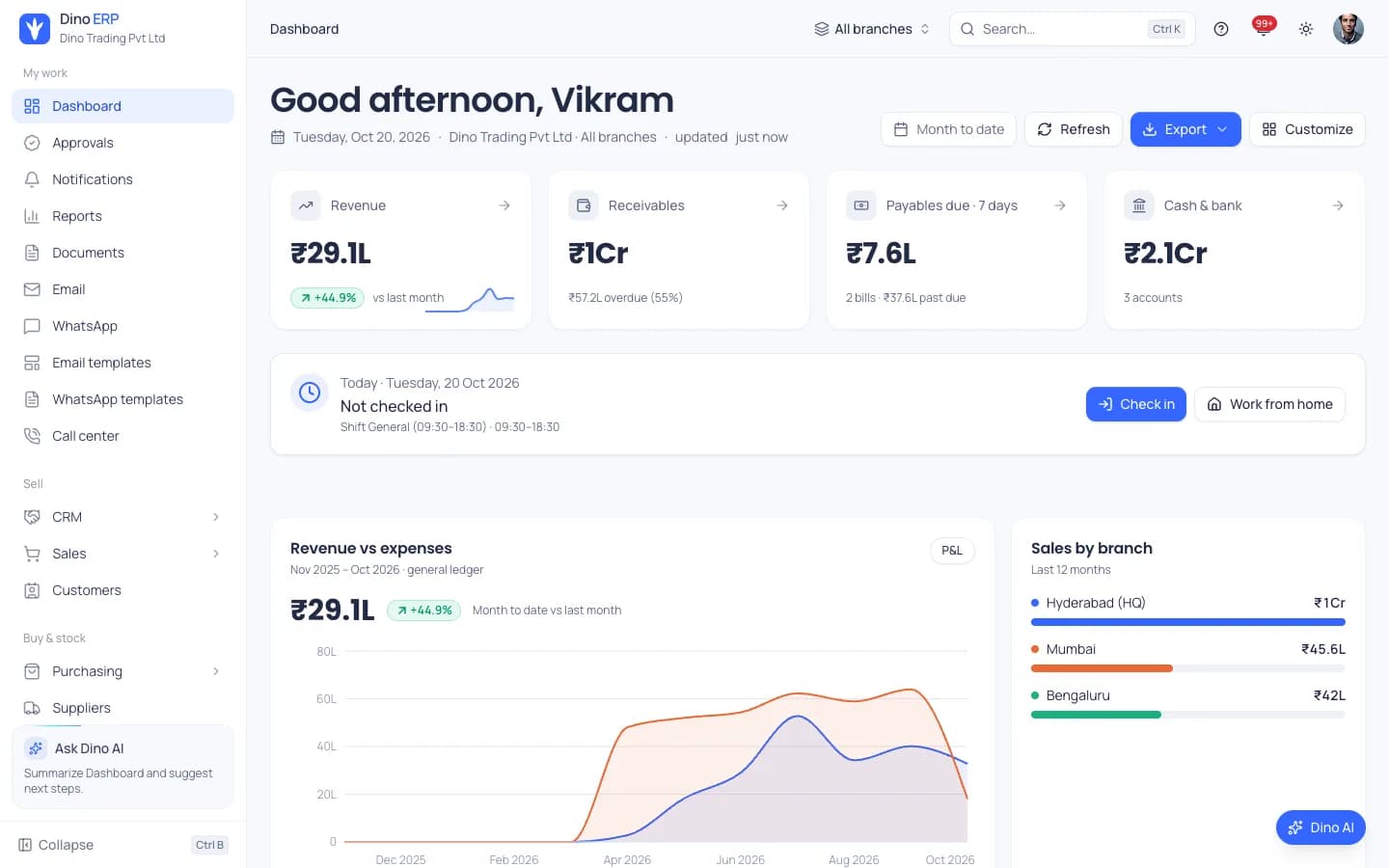
Dashboard — Revenue, receivables, cash and sales by branch
adminDashboard — Revenue, receivables, cash and sales by branch
Dino AI — Ask about customers, orders, stock or finances within your permissions
adminDino AI — Ask about customers, orders, stock or finances within your permissions
Forecasts & Insights — Revenue, cash flow and demand forecasts with a backtest
adminForecasts & Insights — Revenue, cash flow and demand forecasts with a backtest
CRM Pipeline — Weighted deals by stage from first contact to won or lost
adminCRM Pipeline — Weighted deals by stage from first contact to won or lost
Sales Orders — Credit check, stock reservation, delivery and invoicing
adminSales Orders — Credit check, stock reservation, delivery and invoicing
Purchase Orders — Approval, sending, receiving and billing
adminPurchase Orders — Approval, sending, receiving and billing
Stock on Hand — Quantities per warehouse, bin and batch with valuation
adminStock on Hand — Quantities per warehouse, bin and batch with valuation
Invoices — Bill customers, post to receivables and track what is due
adminInvoices — Bill customers, post to receivables and track what is due
Chart of Accounts — Double-entry ledger with live balances
adminChart of Accounts — Double-entry ledger with live balances
Reports — Financial statements, ledgers, aging and drill-down
adminReports — Financial statements, ledgers, aging and drill-down
Payroll — Pay periods, approval-routed runs and statutory due dates
adminPayroll — Pay periods, approval-routed runs and statutory due dates
Recruitment — Hiring pipeline by stage from screening to offer
adminRecruitment — Hiring pipeline by stage from screening to offer
Projects — Hours, billing and profitability per project
adminProjects — Hours, billing and profitability per project
Shop Floor — Released operations by priority and due date
adminShop Floor — Released operations by priority and due date
Helpdesk — Tickets with SLA clocks, queues and channels
adminHelpdesk — Tickets with SLA clocks, queues and channels
Point of Sale — Offline-ready registers, sessions and end of day
adminPoint of Sale — Offline-ready registers, sessions and end of day
Subscriptions — MRR, ARR, churn and renewals
adminSubscriptions — MRR, ARR, churn and renewals
Rental — Availability calendar with bookings, holds and returns
adminRental — Availability calendar with bookings, holds and returns
Fixed Assets — Net book value, depreciation and maintenance
adminFixed Assets — Net book value, depreciation and maintenance
Roles & Permissions — Module, resource and action permissions with record scope
adminRoles & Permissions — Module, resource and action permissions with record scope
Product Website — One-time purchase ERP with source code
adminProduct Website — One-time purchase ERP with source code
Login Portal — Quick demo sign-in for 16 roles
adminLogin Portal — Quick demo sign-in for 16 roles
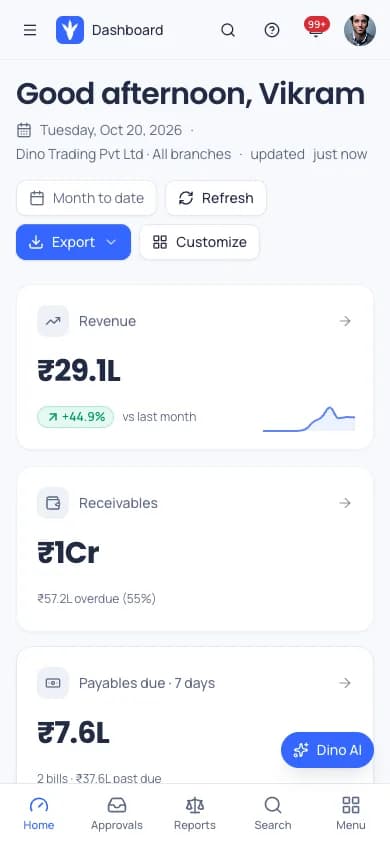
Mobile Dashboard — Responsive ERP on phones
mobileMobile Dashboard — Responsive ERP on phones
How the Application Works
End-to-end workflow across Super Admin, ERP Admin, CEO, Branch Manager, Sales Manager, Sales Executive, Purchase Manager, Warehouse Manager, Warehouse Operator, Finance Manager, Accountant, HR Manager, Project Manager, Production Manager, Service Manager, Auditor, Customer Portal User, Supplier Portal User.
Sell: a qualified lead becomes a quotation, an approved order, a pick and a delivery
Step 1Buy: compare supplier quotes, approve the purchase order and receive into the warehouse
Step 2Post: invoices, bills and stock movements post to the double-entry ledger
Step 3Reconcile: import bank statements and auto-match them against payments
Step 4Pay people: attendance and leave flow into an approval-routed payroll run
Step 5Report: live statements and dashboards for one branch or all, with Ask Dino for questions
Step 6Dino ERP roles, modules and integrations
User roles
Super Admin, ERP Admin, CEO, Branch Manager, Sales Manager, Sales Executive, Purchase Manager, Warehouse Manager, Warehouse Operator, Finance Manager, Accountant, HR Manager, Project Manager, Production Manager, Service Manager, Auditor, Customer Portal User, Supplier Portal User
Modules
CRM, Pipeline & Campaigns, Sales: Quotations, Orders, Deliveries & Returns, Purchasing: Requests, RFQs, Purchase Orders & Receipts, Inventory & Warehouse Management (WMS), Finance, Banking & Double-Entry Ledger, Tax & Country Setup: India GST, VAT, GST, SST & US Sales Tax, HR, Attendance, Leave & Payroll, Recruitment & Onboarding, Projects, Timesheets & Billing, Manufacturing, MRP & Quality, Assets & Maintenance, Helpdesk & Field Service, Point of Sale with Offline Selling, E-commerce, Subscriptions & Rental, Customer & Supplier Portals, Communications: Email, WhatsApp, Call Logging & SMS Notifications, Approvals, Workflow Automation & Bulk Import, Documents, Print Layouts & PDF, Reports & Dashboards, Dino AI: Ask Dino, Agents, Document Capture & Forecasts, Platform: Languages, SSO, SCIM & Audit Trail
Integrations
Shopify and WooCommerce, Stripe, Razorpay and PayPal pay links (your account), WhatsApp via Meta Cloud API or Twilio; SMS via MSG91 or Twilio, SMTP and IMAP email, Shippo, Shiprocket and Delhivery carrier labels and tracking, Twilio and Exotel call callbacks, MT940, CAMT.053 and OFX bank statements; Tally XML export, OpenAI, Anthropic, Gemini, Azure OpenAI, Mistral, Groq, OpenRouter, Hugging Face, Ollama and OpenAI-compatible models (your key or server), REST API, signed webhooks and MCP tool servers, OpenID Connect and SAML single sign-on with SCIM 2.0
Reports
P&L, balance sheet, cash flow, trial balance and general ledger for any period and branch, AR and AP aging, customer and supplier ledgers, tax summary and budget variance, Sales revenue, margin, top customers and quotation conversion, CRM funnel, pipeline, lead sources and call report, Purchasing spend and price variance; stock valuation, aging and turnover, GSTR-1 and GSTR-3B, TDS and withholding register and draft UAE VAT workpapers, Production, SPC, asset, rental, MRR and churn reports, Role dashboards, report builder and scheduled exports, Dino AI forecasts for sales, demand and cash flow
Integration scope
- Shopify & WooCommerce · configuration
- Stripe / Razorpay / PayPal (your account) · configuration
- WhatsApp via Meta Cloud API or Twilio · configuration
- SMS via MSG91 or Twilio · configuration
- SMTP / IMAP Email · configuration
- Shippo / Shiprocket / Delhivery (your account) · configuration
- Twilio / Exotel Call Callbacks · configuration
- MT940 / CAMT.053 / OFX Bank Statements · built in
- Tally XML Export · built in
- REST API & Signed Webhooks · built in
- MCP Tool Servers · configuration
- OpenAI / Anthropic / Gemini / Azure OpenAI / Mistral / Groq / OpenRouter / Hugging Face (your key) · configuration
- Ollama / vLLM / LM Studio / OpenAI-compatible (self-hosted) · configuration
- OpenID Connect (Azure, Google, Okta, Keycloak) & SAML SSO, SCIM 2.0 · configuration
- India IRP E-invoice & E-way Bill (your GST credentials and GSP where required) · configuration
- ZATCA Phase 2 Onboarding (built, not yet certified) · configuration
- UAE PINT-AE & EU Peppol (accredited provider required, not bundled) · custom
- Attendance Devices via API Push · built in
- Browser Web Push (VAPID keys on your server) · built in
- Other Business Systems · custom
Super Admin / ERP Admin
- Switch on modules and set up branches, departments and fiscal years
- Define roles, record scopes and approval workflows
- Connect AI providers and choose the privacy mode
- Review audit logs and access reviews
CEO
- See revenue, receivables, payables and cash for all branches or one
- Approve requests from the approvals inbox
- Ask Dino about overdue invoices, pending approvals or stock below reorder point
Sales Manager
- Track every deal on the pipeline board
- Approve quotation discounts and below-margin prices
- Review commissions and customer statements
Warehouse Manager
- Direct putaway, release pick waves and plan delivery runs
- Transfer stock between branches
- Run cycle counts and reorder rules
Finance Manager
- Review automatic postings, journals and supplier payment runs
- Import bank statements and auto-match them
- Run P&L, balance sheet and cash flow for one branch or all
HR Manager
- Maintain employee records, shifts and leave policies
- Run payroll, payslips and bank files through approval
- Manage requisitions, interviews, offers and onboarding
Auditor
- Review the audit trail with who, when and old and new values
- Drill down from statements to the underlying documents
- Check approval history on each document
What You Receive
- Source code for the Next.js web app, Express API and background worker
- Database schema, migrations and seed data
- All product areas in one codebase, switched on per business
- Docker Compose stack with web, API, worker, MySQL, Redis, nginx, vector search and daily backups
- Setup documentation and admin training at handover
- Three months of technical support
- Complete source code for the applications and modules in the agreed purchase scope
- Frontend application source code
- Backend API source code
- Admin dashboard source code
- Database schema and migration files
- Application setup documentation
- Environment configuration guidance
- White-label branding support
- Basic deployment assistance
- Server and database migration assistance
- 3 months of technical support
After purchase, you receive the complete source code for the agreed project scope. Branding, basic setup, deployment and migration assistance are included as agreed. A standard branded setup is estimated at approximately 2 weeks after required assets and access are confirmed, subject to the written schedule and third-party dependencies. Three months of technical support starts on the confirmed delivery date.
Deployment and Migration Support
TechDino provides basic migration and deployment assistance to help move the application to the customer's server, VPS, cloud hosting or supported hosting environment. This includes environment setup guidance, database migration, application build guidance and basic deployment verification.
What migration support does not cover
- Hosting fees are not included
- Domain charges are not included
- Paid third-party APIs are not included
- SMS, email, maps and payment-gateway charges are not included
- Major server architecture changes are quoted separately
- New features and large customizations are not included in migration support
Three Months Technical Support Included
Every TechDino project includes three months of technical support from the confirmed delivery date. This support covers installation guidance, deployment-related assistance, configuration help, clarification of the existing codebase and correction of verified issues within the delivered project scope.
Support includes
- Installation guidance
- Environment configuration help
- Deployment clarification
- Database migration clarification
- Existing-feature usage guidance
- Verified bug fixes within the delivered scope
- Basic codebase clarification
- Build and release guidance
Support does not include
- New modules
- New business workflows
- Major UI redesigns
- Third-party service fees
- New third-party integrations
- Infrastructure or hosting costs
- Continuous server administration
- Changes outside the original agreed scope
Additional development, custom features and support after the included three-month period can be provided under a separate support or development agreement.
Source Code and Customization
The customer receives the complete source code included in the agreed product scope. The application can be deployed under the customer's brand, domain and hosting environment. The customer can maintain, extend and customize the delivered application according to the applicable purchase or licence agreement.
Scope for Dino ERP: Applicable source code for the Next.js web app, Express API, background worker, database schema, migrations and seed data, plus the Docker Compose configuration and setup documentation, is provided for every product area in one codebase, with the agreed modules switched on and configured. Licence type: Commercial License / Software Grant.
Usage, copyright and resale termsDino ERP by market
Dino ERP is client-hosted, so each deployment can be scoped around the buyer's currency, timezone, payment providers, data-hosting preference and local integration requirements. These market notes describe planning considerations, not a local office or completed client claim.
- India & HyderabadFor Indian businesses, the India GST profile splits CGST and SGST or IGST by place of supply, prepares GSTR-1 and GSTR-3B data and pairs with the India payroll starter pack and Hindi interface. It also covers reverse charge, IRP e-invoice and e-way bill data, GSTR-1 portal JSON for you to upload, the supplier TDS register and Tally XML export. Plan in-country hosting and a review of statutory rates by your accountant before go-live.Review market requirements
- UAE & GulfFor UAE, Saudi Arabia, Bahrain and Oman, VAT starters come with a UAE payroll starter with a draft WPS salary file, a Saudi GOSI starter that needs payroll-owner sign-off, and payroll templates for Bahrain and Oman. The staff interface and printed documents support Arabic right-to-left; the customer and supplier portals have no language picker yet. ZATCA Phase 2 onboarding is built but not yet certified, and UAE e-invoice transmission needs an accredited provider, so confirm both with your advisers before go-live.Review market requirements
- USA & CanadaFor the US, the sales-tax starter sets tax codes, registration labels and invoice fields, with rates entered manually per state and locality, and a US payroll template needs local review. Canada uses the generic tax profile, so GST, HST and PST codes are set up with your accountant. Shopify and WooCommerce sync, Stripe and PayPal pay links and Shippo labels run under your own accounts.Review market requirements
- UK & EuropeThe UK has a VAT starter and a payroll template; the EU profile is a baseline that needs member-state rates, and the EU has no payroll starter. Peppol e-invoicing needs an accredited provider and is not bundled. Data stays on the server you choose, and AI requests go only to your configured provider or a self-hosted model, which helps a GDPR review.Review market requirements
- Southeast Asia & KoreaSingapore GST and Malaysia SST starters come with payroll templates for both, and South Korea has a VAT starter and payroll template. Indonesia, the Philippines and other markets use the generic tax profile. Multi-currency and FX revaluation cover cross-border trade; confirm statutory rates and e-invoicing rules with your accountant before go-live.Review market requirements
- Australia & New ZealandAustralia and New Zealand GST starters come with payroll templates for both countries, which need review against local tax and award rules before the first live pay run. Multi-currency, bank statement import and Shopify or WooCommerce sync support local trading, and the stack can run in a cloud region you choose.Review market requirements
- AfricaNigeria, Kenya, South Africa and other African markets use the generic tax profile, with VAT codes and rates set up with your accountant, and payroll components are configured as custom setup because no African payroll template ships today. Multi-currency handles NGN, KES or ZAR alongside USD, and the POS keeps selling offline when connectivity drops.Review market requirements
Technology and Architecture
Technology stack
- Web application: Next.js 15 and React 19, responsive for desktop, tablet and phone
- Backend: Express 5 API in TypeScript with Prisma, MySQL 8, Redis and BullMQ background jobs
- AI: hosted or self-hosted model providers, vector search, and Standard, Strict or Air-gapped privacy modes
- Security: permission checks on 2,500+ API routes, OpenID Connect and SAML SSO, SCIM 2.0, passkeys, TOTP and audit trail
- Controls: builds fail when a route ships without a permission gate, document numbering is gap-free, closed periods reject postings, secrets are encrypted at rest, sessions can be revoked, logins are rate-limited and webhooks are HMAC-signed
- Deployment: one Docker Compose stack with web, API, worker, MySQL, Redis, nginx, vector search and daily backups
Deployment options
- Client-Controlled VPS
- Hostinger / DigitalOcean / Linode / Hetzner
- AWS / Google Cloud / Microsoft Azure
- On-Premises Server
- Docker Compose
Data migration covered
- Customer, supplier, lead and product import from Excel or CSV with a review step
- Opening balances and opening stock posted through the finance and inventory engines
- Employee records import
- Docker Compose deployment on your own server
Dino ERP is fully customizable to your brand
Nothing ships carrying the TechDino name. Every surface a customer or staff member sees is rebranded to your business before handover, and because the source code is yours, your own team can change anything afterwards.
- Business name, logo and app icons
- Brand colour palette and typography
- Your own domain and SSL certificate
- Login, email and notification templates
- Invoice, receipt and report branding
- App-store listing assets under your developer account
- Content, labels and terminology for your market
- Currency, timezone, tax and language settings
White-label options specific to Dino ERP
- Your product name, logo, colors and custom domain
- Branded print layouts with logo, bank details and signature blocks
- Branded customer and supplier portals and careers page
- Email and WhatsApp templates in your wording
- Right-to-left document layouts for Arabic
- Your brand name, logo, colors and domain
- Module switches for the areas your business uses
- Branches, departments, roles and record scopes
- Approval workflows by amount, branch and department
- Country tax profile and payroll components
- Custom fields, saved views and print layouts
- Additional modules built to your process
Transform Dino ERP into Your Brand
Toggle between our base demo branding and a customized client launch build.
Theme Colors
Custom Corporate Palette
Domain & SSL
Client Custom Domain
App Stores
Published Under Your Account
What business owners get
- No per-user subscription: a one-time quotation for the agreed scope, hosted on your server
- Complete source code for every product area under commercial license, so your developers can extend it
- One ledger, one catalog and one customer list across every branch
- Business data stays on your server; AI requests go only to the provider you configure, or stay on your network with a self-hosted model
- The software keeps running after the support period; nothing expires
How TechDino Compares to Alternative Software Delivery Models
Evaluating ready-made software against custom development from scratch or recurring monthly SaaS subscriptions.
Ready-Made Dino ERP
- Timeline: 2-Week Setup Estimate; final schedule confirmed after scope review
- Pricing: One-time quotation per agreed scope
- Code Access: Full source-code handover included
- Hosting: Self-hosted on client VPS (Hostinger, AWS, DigitalOcean)
- Software Fees: 0 recurring platform fees
Development From Scratch
- Timeline: Onboarding varies by vendor and scope
- Pricing: Agency quotes vary with scope; compare the written quotation you receive
- Code Access: Handed over upon project sign-off
- Hosting: Cloud infrastructure setup
- Risks: Scope changes, milestone delays, untested edge cases
Rental Subscriptions
- Timeline: Onboarding varies by vendor and scope
- Pricing: Compare actual subscription and usage charges
- Code Access: Check the vendor’s source and export terms
- Hosting: Check available hosting and residency options
- Customization: Compare supported extensions and APIs
Global Deployment, Currency & Invoicing Support
Delivery is coordinated remotely from Hyderabad. Currency, language, hosting and payment requirements are reviewed against this product’s included scope.
Scope INR billing, tax fields, gateway credentials and India hosting requirements for this product. Only the integrations listed in the agreed scope are included.
India Market DetailsReview USD/CAD billing, payment-provider eligibility and your preferred hosting country. Gateway and infrastructure choices depend on the product and agreed scope.
USA Market DetailsConfirm AED/SAR billing, language requirements, supported gateways and the exact hosting country. Arabic interfaces and new integrations are separately scoped where not included.
UAE Market DetailsReview GBP/EUR billing, payment providers, export needs and the required hosting country. Hosting alone does not establish regulatory compliance.
UK Market DetailsConfirm AUD/SGD billing, gateway availability and your required hosting country. Payment and deployment options are reviewed for the actual application.
Australia Market DetailsExplore target markets and discuss payment, tax, timezone and hosting requirements for your deployment.
Dino ERP frequently asked questions
What is Dino ERP?
Dino ERP is AI-powered ERP software from TechDino, sold as a one-time purchase and self-hosted on your server under your brand. Sales, purchasing, inventory, finance, HR and payroll, manufacturing, service, POS and e-commerce share one database, one ledger and one permission model across 27 product areas.
What does Dino AI do inside the ERP?
Ask Dino answers questions, summarizes and drafts text from records the user can access, and knowledge search returns cited passages. Ask Dino also rewrites and translates text and declines when sources do not support an answer. Document capture turns supplier bills, receipts, delivery notes and bank statements into reviewable drafts. Forecasts cover sales, demand, cash flow and AI spend, with scenarios and accuracy views, and anomaly insights flag outliers and link to the source records. Agents run manually, on a schedule or on events with the initiating user's permissions. Nothing is posted or approved by the AI; a person approves each draft and proposed change.
Does Dino AI send our data to an AI provider?
Only to the provider you configure with your own account, such as OpenAI, Anthropic, Google Gemini, Azure OpenAI, Mistral, Groq, OpenRouter or Hugging Face, or to a model you run yourself with Ollama, vLLM or LM Studio. Strict mode limits routing to zero-retention or self-hosted models, Air-gapped mode allows self-hosted models only, and AI can be switched off. Email addresses, phone numbers and tax IDs are masked in text sent to external models on a best-effort basis; document images are not masked.
Is the source code included, and what does the license allow?
Yes. The Next.js web app, Express API, background worker, database schema, migrations and seed data for every product area are handed over, with the agreed modules switched on and configured, with the Docker Compose setup and documentation. The commercial license covers use, modification and deployment for your business; deploying it for other businesses needs a reseller arrangement with the number of installs written into the agreement.
How much does Dino ERP cost, and is there a per-user fee?
Price depends on the modules, branding, integrations and data migration in scope, so a one-time written quotation follows a demo. TechDino charges no per-user or monthly fee for the software. Hosting, domain, email, SMS, WhatsApp, payment gateway and AI provider usage are billed separately by those providers.
Where can Dino ERP be hosted, and are hosting costs included?
Anywhere Docker runs: a Linux VPS such as Hostinger, DigitalOcean, Linode or Hetzner, AWS, Google Cloud or Microsoft Azure in the region you choose, or servers on your premises, including fully offline with self-hosted AI models. Hosting costs are not included and are paid to your provider.
Can one installation run several companies or branches?
Each installation runs one company in one operating country, with as many branches as it needs. Branches share customers, products, the ledger and permissions, each team sees its own branch, and any screen or report can be narrowed to one branch or show all of them.
Which countries' tax rules does Dino ERP support?
India GST with CGST and SGST or IGST by place of supply, HSN/SAC codes and GSTR-1 and GSTR-3B reports, plus VAT, GST, SST and sales-tax starters for the UAE, Saudi Arabia, Bahrain, Oman, the UK, the EU, Australia, New Zealand, Singapore, Malaysia, South Korea and the US, and a generic profile for other countries. These are starting configurations for your accountant to review before go-live, and e-invoice transmission depends on the local provider and your credentials. Native ZATCA Phase 2 onboarding is built but not yet certified.
Which countries have payroll starter packs?
India has a starter pack covering PF, ESI, PT, LWF, TDS and gratuity, the UAE has a payroll starter and Saudi Arabia has a GOSI starter that needs payroll-owner sign-off. Templates are provided for Australia, New Zealand, Singapore, Malaysia, South Korea, the UK, the US, Bahrain and Oman. Every pack needs local review before the first live payroll run.
Which integrations are included?
Shopify and WooCommerce, SMTP/IMAP email, WhatsApp through Meta Cloud API or Twilio, SMS through MSG91 or Twilio, Stripe, Razorpay and PayPal pay links, Shippo, Shiprocket and Delhivery labels, MT940, CAMT.053 and OFX bank statements, Tally XML export, and a REST API with signed webhooks. Each connection uses your own provider account, and TechDino does not charge per integration.
Is migration support included for our existing data?
Yes. Setup includes import of the customers, suppliers, products, employees and opening balances you supply. The bulk importer reads Excel and CSV files, maps columns, flags duplicates and shows a review table before anything is saved. Historical invoices are not part of bulk import.
Can Dino ERP carry our brand?
Yes. Your name, logo, colors and domain are applied to the app during installation, along with branded document print layouts and the customer and supplier portals.
Is there a mobile app, and does the POS work offline?
Dino ERP is a responsive web application. The point of sale keeps selling offline in the browser and syncs when the connection returns, and the field-service technician web app queues visit completions offline. Native Android or iOS apps are not part of the product today.
What does Dino ERP not do today?
Calls are logged against records, with no click-to-call, IVR or softphone, and SMS is used for notifications only. E-commerce sync covers Shopify and WooCommerce. Cards are not saved for auto-charging, and POS card payments use an external terminal. The customer and supplier portals have no language picker yet, and no SOC 2 or ISO certification is claimed.
Can I add custom modules or new features?
Yes. Your own developers can extend the source code under the license, or TechDino can build custom modules and new integrations under a separate quotation.
Can I try Dino ERP before buying?
Yes. The demo at dinoerp.techdino.in/login offers quick sign-in for 16 roles, from Super admin, CEO and Branch manager to Warehouse operator, Accountant, Production manager and Auditor, on a sample trading company with illustrative INR data. A separate sign-in opens the customer and supplier portal, and the product website has a feature tour.
What happens after the three months of technical support?
The software keeps running; nothing expires. The three months cover installation, configuration and codebase questions plus fixes for verified bugs in the delivered scope. Ongoing help, updates or new development after that are available under a separate support or development agreement.
How is Dino ERP different from subscription ERP software?
Subscription ERPs are rented per user or per month and run on the vendor's cloud. Dino ERP is bought once for the agreed scope and runs on a server you choose, with the source code. You take on hosting and server administration yourself, so the better fit depends on whether you want to run your own infrastructure.
How is Dino ERP different from Dino Business OS?
Both are self-hosted TechDino products with source code. Dino Business OS connects eleven operating areas for distributors, service firms and field service teams, with INR payroll and a multi-agent assistant. Dino ERP covers 27 product areas that add manufacturing, quality, warehouse management, point of sale, e-commerce, subscriptions, rental and customer and supplier portals, with tax and payroll starters for several countries and an English, Hindi and Arabic interface.
How long does it take to launch Dino ERP?
A standard branded deployment is estimated at approximately 2 weeks after the scope, brand assets, hosting access and required service credentials are confirmed. The estimate covers agreed branding, environment setup, supported integration configuration, supplied-data migration, testing and handover. Actual timing depends on product scope, data readiness, client approvals and third-party dependencies. Custom modules and new integrations are quoted separately; the written project schedule governs delivery.
Related products and resources
Dino Business OS
Dino Business OS — AI-Powered Business Operations Software
View productDino Inventory
Dino Inventory — AI-Native Inventory Management Software
View productDino HRMS
Dino HRMS AI-Powered HR Management & Payroll Software
View productGuides for Dino ERP
White-Label ERP Software: How to Rebrand, Resell or Run Your Own ERP
What white-label ERP software is, who buys it, what can be rebranded, how it compares with open-source and SaaS ERP, and the licence terms resellers need in writing.
Read the guideERP Software with Source Code: What You Receive, What the Licence Allows and What It Costs to Run
Buying ERP once with the source code instead of renting it per user: what the handover contains, what the licence permits, a five-year cost framework and when it is the wrong choice.
Read the guideWhat Is AI-Powered ERP Software and Why Growing Businesses Need It
AI-powered ERP software connects CRM, sales, procurement, inventory, HR, payroll and finance with an AI assistant that answers from live records. Learn how it works, who it suits and what to look for.
Read the guideSelf-Hosted ERP vs SaaS ERP: Which Model Suits Your Business?
A side-by-side comparison of self-hosted ERP with source code and SaaS ERP subscriptions covering cost, data control, customisation, vendor lock-in and deployment for businesses in India, UAE and global markets.
Read the guideSelf-Hosted Enterprise ERP Software: Unifying Inventory, Invoicing, and Supply Chain
Discover how self-hosted enterprise ERP software coordinates procurement, warehouse stock, sales orders, and financial ledger accounting on private infrastructure.
Read the guideWarehouse Management Software for Distributors and Wholesalers: A Practical Buyer's Guide
Which warehouse management functions a distributor actually needs — locations and putaway, receiving, allocation and picking, traceability and reporting — and how Dino WMS covers them with an AI assistant that proposes rather than acts.
Read the guideMulti-Location Inventory Management Software: Real-Time Stock Sync & Batch Tracking
Discover how self-hosted multi-location inventory management software tracks stock balances, batch expiry dates, and automated purchase orders across warehouse networks.
Read the guideBuying Enterprise ERP Software with Source Code: A Production Buyer's Guide
A complete production buyer's evaluation guide for purchasing enterprise ERP software with source code, self-hosted Docker deployment, and zero per-seat licensing fees.
Read the guideDeploy Dino ERP under your brand
Source code for the agreed scope, migration assistance and three months of technical support, delivered by TechDino.
Or Chat Directly on WhatsAppRequest a Dino ERP Walkthrough
Tell us what you want to launch. Prepare a WhatsApp message for Nayesh. Response time depends on availability.