
AI Powered Project Management Software — DinoFlow
AI-Powered Project Management Software with Source Code
DinoFlow is an AI-powered, self-hosted, white-label work management platform with list, board, table, timeline and calendar views, sprints, docs and sheets, chat, goals and OKRs, time tracking, automations and Dino Brain, a supervisor with five specialist AI agents that act with the permissions of the person asking.
Built for: Software & Product Teams, IT Services & Consulting, Agencies & Professional Services, Marketing & Creative Teams
- Complete Source Code
- Fully Brand-Customizable
- 2-Week Setup Estimate
- Migration Assistance
- 3 Months Support
Complete source code
Frontend, backend, admin dashboard and database schema for the agreed scope — handed to you, not rented.
Fully customizable to your brand
Business name, logo and app icons, Brand colour palette and typography, Your own domain and SSL certificate, Login, email and notification templates and more — applied before handover.
2-Week Setup Estimate
A standard branded deployment is estimated at approximately 2 weeks after the scope, brand assets, hosting access and required service credentials are confirmed. The estimate covers agreed branding, environment setup, supported integration configuration, supplied-data migration, testing and handover. Actual timing depends on product scope, data readiness, client approvals and third-party dependencies. Custom modules and new integrations are quoted separately; the written project schedule governs delivery.
DinoFlow is AI-powered, self-hosted project management software from TechDino. Dino Brain, a supervisor with five specialist agents, triages requests, plans sprints, writes reports and answers from your docs inside each user's permissions. Complete source code for the agreed scope, migration assistance and three months of technical support are included; setup is approximately two weeks after assets and access are confirmed.
What is DinoFlow?
- Launch window
- 14 days for a standard branded deployment
- Tenancy model
- Single business (one organisation per deployment)
- Source code
- Included — Commercial License / Software Grant
- Deployment
- Client-Controlled VPS, Hostinger Cloud, AWS / DigitalOcean, Docker Compose
DinoFlow is a ready-made, white-label work management web application from TechDino for product teams, delivery managers, PMOs, agencies and business leaders who want tasks, docs, chat and planning in one workspace they host themselves. Work is shown as a list, board, table, timeline, calendar, map, mind map or whiteboard, saved per project, with Kanban WIP limits, a timeline with finish-to-start dependencies and critical path, a backlog with sprints, capacity and burndown, custom fields, workflows and required fields, risks, milestones and releases. Around the work sit docs and wiki pages with export to Word, PDF and Excel, sheets with formulas, channels and threads that turn messages into tasks, sync-up calls, intake forms, goals and OKRs linked to delivery, time tracking with approved timesheets, a workload view that shows who is over capacity, dashboards and reports, and a personal planner. Automations pair a trigger, conditions and actions, including AI actions and an unattended Dino Brain agent step with a run history. Dino Brain is a supervisor with five specialist agents for work and triage, planning and sprints, reports and time, knowledge search over your docs, and chat and inbox. Every agent call goes through the DinoFlow API as the signed-in person, so it sees and changes only what that person could, asks before bulk changes and can be set to read-only. You connect your own OpenRouter, OpenAI, Anthropic or OpenAI-compatible provider, assign separate models per job with backups, and watch spend, tokens and latency in a usage dashboard with a monthly token budget. Administration covers roles composed from fine-grained permissions scoped to own, team, department, project or everything, guest access limited to invited projects, OpenID Connect and SAML single sign-on, authenticator-app two-factor, API tokens, audit logs and encrypted provider keys. The interface is available in eight languages including right-to-left Arabic. The live demo offers four role-based quick sign-ins on illustrative sample data, not TechDino customer claims.
Product, delivery and operations teams that want boards, sprints, docs, chat, goals and AI agents in one workspace on their own servers, with no per-seat subscription.
How can you buy DinoFlow?
DinoFlow with source code
DinoFlow is delivered with the complete source code included in the agreed product scope — frontend, backend, admin dashboard, database schema and any applicable mobile application code. Source-code access, licensing rights and ownership terms are set out in the applicable purchase or licence agreement, so the delivered application can be maintained and extended by your own team.
Source-code access, copyright and licensing rightsSelf-hosted DinoFlow
DinoFlow runs on hosting you control — your own VPS, cloud account or existing infrastructure — rather than on a vendor platform. Deployment, database setup and migration assistance are included, and there is no mandatory monthly platform fee attached to the software itself. Third-party services such as payment gateways, SMS providers and hosting are billed by those providers directly.
Self-hosted deployment optionsWhite-label DinoFlow
DinoFlow can use your name, logo, colour scheme, domain and applicable templates; app-store assets apply where a mobile application is in scope. A standard branded deployment is estimated in approximately 2 weeks after scope and required assets are confirmed, subject to client approvals, data readiness, third-party dependencies and the written schedule.
What white-label customization coversDinoFlow for agencies and resellers
Agencies, studios and IT partners can take DinoFlow to their own clients under their own brand. Licensing terms for reselling, the number of deployments permitted and any ongoing support arrangement are defined in the applicable agreement before the engagement starts.
Reseller and partner arrangementsApplications Included
DinoFlow is delivered as the 5 applications below. Each one is part of the purchase scope.
- Visitors evaluating the product before signing in01
Public Product Website
- Product overview and Dino Brain AI page
- Interactive feature demos on sample data
- Security, pricing and FAQ pages
- Team members, project managers, auditors and guests with role-based access02
Work Management Workspace
- Four role-based quick sign-ins in the demo
- Projects, sprints, docs, chat, goals and time tracking
- Dino Brain AI assistant
- The business owner and back-office team03
Admin Dashboard
- Organization, departments, teams and company holidays
- Roles composed from fine-grained permissions scoped to own, team, department, project or all
- Dino Brain provider connections, model assignments per job and backup models
- AI usage dashboard with spend, tokens, latency and a monthly token budget
- Email, integrations, webhooks and API tokens
- Single sign-on and two-factor sign-in policy
- The applications above, and any system you integrate later04
Backend REST API
- REST endpoints used by the web and admin applications
- Authentication and session handling
- Role and permission checks
- Endpoints for the integrations configured during setup
- Your server or managed database instance05
Database
- Database schema for every module listed above
- Migration files used during setup
- Reference data required for first run
Optional add-ons: Android application, iOS application. These are not part of the standard package and are quoted separately.
Branding and setup plan for DinoFlow
A standard branded deployment is estimated at approximately 2 weeks after the scope, brand assets, hosting access and required service credentials are confirmed. The estimate covers agreed branding, environment setup, supported integration configuration, supplied-data migration, testing and handover. Actual timing depends on product scope, data readiness, client approvals and third-party dependencies. Custom modules and new integrations are quoted separately; the written project schedule governs delivery.
- Day 1–2
1. Requirements and brand assets
Scope confirmation, logo, colour palette, domain, company details and the integration credentials you want configured.
- Day 3–6
2. White-label branding applied
Brand identity, theme colours, typography, app icons, email and notification templates applied across every included interface.
- Day 7–10
3. Deployment and integrations
Server or cloud deployment, domain and SSL, database setup, payment gateway, SMS, email and maps configuration.
- Day 11–14
4. Migration, testing and handover
Migration of supplied data, walkthrough testing, source-code handover, documentation and admin training. Three months of technical support starts here.
Who can use DinoFlow?
- Delivery managers and PMOs who need portfolio health, workload and risks across projects
- Product and engineering teams running Scrum or Kanban with sprints, backlog and timeline
- Agencies and consultancies that invite clients as guests to only the projects they are on
- Operations and leadership teams tracking goals and OKRs against the work that delivers them
- Founders replacing a per-seat work management subscription with software they host
Problems DinoFlow solves
Work scattered across a task tool, a docs tool and a chat tool
one workspace with shared permissions.
Status chased by hand each week
dashboards, portfolio health and an AI summary read from the work itself.
Requests triaged one by one
forms and messages become tasks that Dino Brain can prioritize and assign for approval.
Overloaded people found too late
the workload view shows capacity by person and week.
AI features that see everything
every Dino Brain call runs with the asking person's permissions and asks before bulk changes.
Per-seat fees that grow with headcount
self-hosted deployment with source code for the agreed scope.
Application Features
Every module below ships pre-built and is configurable during white-label setup.
Dino Brain AI Agents
A supervisor hands each request to one of five specialist agents for work and triage, planning and sprints, reports and time, knowledge search and chat. Agents use the signed-in person's permissions and ask before bulk changes.
Every Work View
List, board, table, timeline, calendar, map, mind map and whiteboard views saved per project, with Kanban WIP limits and swimlanes.
Timeline & Dependencies
Drag bars to reschedule, link finish-to-start dependencies, see the critical path and fix scheduling conflicts.
Backlog & Sprints
Rank the backlog, pull work into a sprint against capacity, start and complete sprints and follow burndown and velocity.
Docs, Wiki & Sheets
Write documents and wiki pages with AI assistance, calculate in sheets with formulas and export to Word, PDF or Excel.
Chat & Sync-ups
Channels, threads and direct messages next to the work, message-to-task conversion and live sync-up calls.
Goals, OKRs & Portfolio
Company goals with objectives and initiatives linked to projects, plus a portfolio report of health, overdue items and risks.
Time & Workload
Timers, weekly timesheets with approval, capacity by person and week, time off and a count of over-capacity people.
Automations
Triggers, conditions and actions including AI triage, AI subtasks and an unattended Dino Brain agent step with a run history.
Security & Administration
Scope-based roles, guests limited to invited projects, OpenID Connect and SAML single sign-on, authenticator-app two-factor, API tokens and audit logs.
Admin panel capabilities
- Organization, departments, teams and company holidays
- Roles composed from fine-grained permissions scoped to own, team, department, project or all
- Dino Brain provider connections, model assignments per job and backup models
- AI usage dashboard with spend, tokens, latency and a monthly token budget
- Email, integrations, webhooks and API tokens
- Single sign-on and two-factor sign-in policy
- Audit logs with actor, action and entity filters and CSV export
Team member capabilities
- Home with a daily brief, due-today tasks, reminders and pinned priorities
- My Work, inbox and a personal planner that can time-block the day
- Ask Brain beside the task, doc or board being read
- Comments, mentions, attachments with previews and message-to-task
- Saved views and filters per project
- Light and dark themes in eight languages including Arabic
DinoFlow screenshots
Click any image for a full-resolution preview.
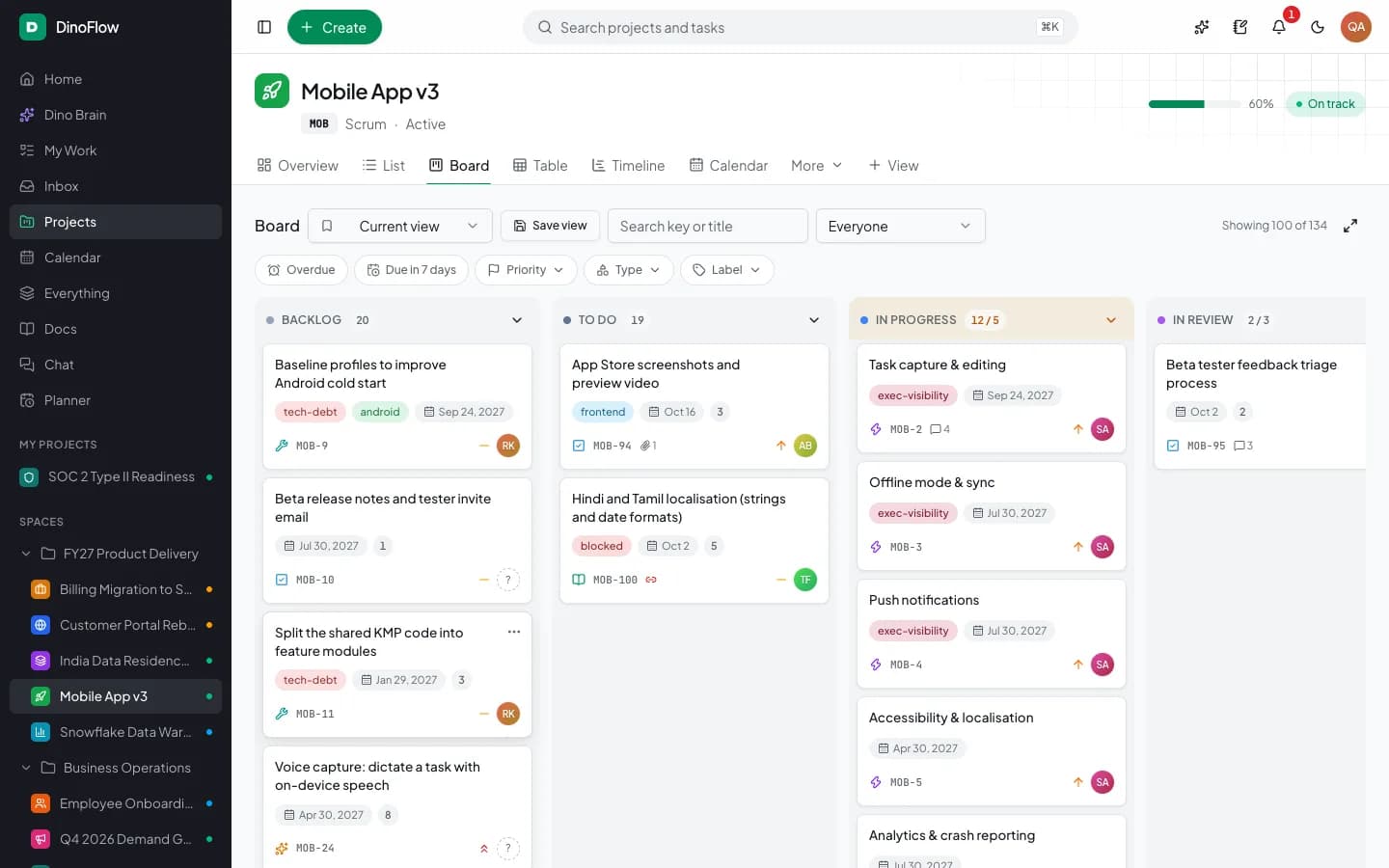
Kanban Board — Columns with WIP limits, labels, priorities and assignees
adminKanban Board — Columns with WIP limits, labels, priorities and assignees
Project Overview — Progress, AI summary and recent work in one place
adminProject Overview — Progress, AI summary and recent work in one place
Timeline — Milestones, dependencies, critical path and conflict detection
adminTimeline — Milestones, dependencies, critical path and conflict detection
Sprints — Capacity, committed points and sprint progress
adminSprints — Capacity, committed points and sprint progress
Automations — Rules with trigger, conditions, actions and run history
adminAutomations — Rules with trigger, conditions, actions and run history
Projects — Health, progress and due dates across every project
adminProjects — Health, progress and due dates across every project
Workload — Capacity, utilization and who is out
adminWorkload — Capacity, utilization and who is out
Goals & OKRs — Company goals linked to objectives and project delivery
adminGoals & OKRs — Company goals linked to objectives and project delivery
Docs & Wiki — Company wiki, documents and sheets
adminDocs & Wiki — Company wiki, documents and sheets
Product Website — Self-hosted work management with Dino Brain AI
adminProduct Website — Self-hosted work management with Dino Brain AI
Login Portal — Quick demo sign-in by role
adminLogin Portal — Quick demo sign-in by role
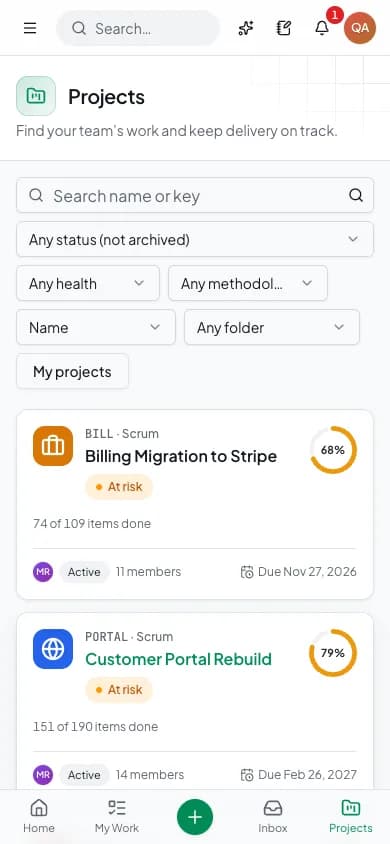
Mobile Projects — Responsive workspace on phones
mobileMobile Projects — Responsive workspace on phones
How the Application Works
End-to-end workflow across Super Admin, Company Admin, Department Head, Project Manager, Product Owner, Scrum Master, Team Lead, Employee, Auditor, Guest.
Capture: intake forms and chat messages become tasks
Step 1Triage: Dino Brain proposes priority, owner and sprint, and you approve the changes
Step 2Plan: rank the backlog and pull work into a sprint against capacity
Step 3Deliver: move work across boards and follow the timeline and critical path
Step 4Track: log time, approve timesheets and watch workload and portfolio health
Step 5Report: dashboards, AI summaries and deep research reports with sources
Step 6DinoFlow roles, modules and integrations
User roles
Super Admin, Company Admin, Department Head, Project Manager, Product Owner, Scrum Master, Team Lead, Employee, Auditor, Guest
Modules
Projects, Portfolio & Workload, List, Board, Table, Timeline, Calendar & Map Views, Backlog, Sprints & Burndown, Docs, Wiki & Sheets, Chat, Threads & Sync-ups, Goals & OKRs, Time Tracking & Timesheets, Risks, Milestones & Releases, Whiteboards, Mind Maps & Intake Forms, Dashboards & Reports, Automations & Webhooks, Dino Brain AI Agents & Knowledge Search, Roles, Permissions, SSO & Audit Logs
Integrations
OpenRouter, OpenAI, Anthropic and OpenAI-compatible AI providers (your key), GitHub and GitLab, Webhooks and API tokens, MCP for AI clients, ICS calendar feeds, OpenID Connect and SAML single sign-on
Reports
Project overview with work item counts, completion and an AI summary, Portfolio report with health, overdue items and open risks by project and department, Workload and capacity by person and week, Sprint progress, committed points and burndown, Goals and OKR progress with linked initiatives, Timesheets and AI usage with spend by model, feature and person
Integration scope
- OpenRouter / OpenAI / Anthropic / OpenAI-compatible (your key) · configuration
- GitHub & GitLab · configuration
- Webhooks & API Tokens · built in
- MCP for AI Clients · built in
- ICS Calendar Feeds · built in
- OpenID Connect & SAML SSO · configuration
- Finance / HR System Sync · custom
Administrator
- Create departments, teams and roles with scoped permissions
- Connect AI providers and assign models per job with backups
- Set the monthly token budget and review AI usage
- Review audit logs and export them to CSV
Project Manager
- Plan sprints against capacity and start them
- Follow the timeline, critical path and scheduling conflicts
- Review portfolio health, risks and workload
- Set up automation rules for the project
Team Member
- Work from My Work, the board or the planner
- Log time and submit the weekly timesheet
- Comment, mention and turn chat messages into tasks
- Ask Dino Brain to triage, summarize or draft from the task
Auditor
- View projects, goals and reports with read-only access
- Check portfolio health and overdue items
- Review who changed what in the audit log
Guest
- See only the projects they are invited to
- Work with the role assigned for each project
What You Receive
- Public product website and work management workspace
- Admin, security and organization settings
- Dino Brain agents and knowledge search modules
- Database schema and migrations
- Docker Compose deployment configuration
- Three months of technical support
- Complete source code for the applications and modules in the agreed purchase scope
- Frontend application source code
- Backend API source code
- Admin dashboard source code
- Database schema and migration files
- Application setup documentation
- Environment configuration guidance
- White-label branding support
- Basic deployment assistance
- Server and database migration assistance
- 3 months of technical support
After purchase, you receive the complete source code for the agreed project scope. Branding, basic setup, deployment and migration assistance are included as agreed. A standard branded setup is estimated at approximately 2 weeks after required assets and access are confirmed, subject to the written schedule and third-party dependencies. Three months of technical support starts on the confirmed delivery date.
Deployment and Migration Support
TechDino provides basic migration and deployment assistance to help move the application to the customer's server, VPS, cloud hosting or supported hosting environment. This includes environment setup guidance, database migration, application build guidance and basic deployment verification.
What migration support does not cover
- Hosting fees are not included
- Domain charges are not included
- Paid third-party APIs are not included
- SMS, email, maps and payment-gateway charges are not included
- Major server architecture changes are quoted separately
- New features and large customizations are not included in migration support
Three Months Technical Support Included
Every TechDino project includes three months of technical support from the confirmed delivery date. This support covers installation guidance, deployment-related assistance, configuration help, clarification of the existing codebase and correction of verified issues within the delivered project scope.
Support includes
- Installation guidance
- Environment configuration help
- Deployment clarification
- Database migration clarification
- Existing-feature usage guidance
- Verified bug fixes within the delivered scope
- Basic codebase clarification
- Build and release guidance
Support does not include
- New modules
- New business workflows
- Major UI redesigns
- Third-party service fees
- New third-party integrations
- Infrastructure or hosting costs
- Continuous server administration
- Changes outside the original agreed scope
Additional development, custom features and support after the included three-month period can be provided under a separate support or development agreement.
Source Code and Customization
The customer receives the complete source code included in the agreed product scope. The application can be deployed under the customer's brand, domain and hosting environment. The customer can maintain, extend and customize the delivered application according to the applicable purchase or licence agreement.
Scope for DinoFlow: Applicable source code, database schema, included migrations and setup documentation are provided for the applications and modules listed in the agreed purchase scope. Licence type: Commercial License / Software Grant.
Usage, copyright and resale termsDinoFlow by market
DinoFlow is client-hosted, so each deployment can be scoped around the buyer's currency, timezone, payment providers, data-hosting preference and local integration requirements. These market notes describe planning considerations, not a local office or completed client claim.
- India & HyderabadFor Indian teams, plan INR quotations, in-country hosting and the Hindi interface, which is one of eight supported languages. Single sign-on with your identity provider and any new integration are scoped separately when not already included.Review market requirements
- UAE & GulfFor UAE and Gulf teams, the Arabic interface supports right-to-left layout. Confirm AED quotation, hosting location and which AI provider endpoint your data policy allows before implementation.Review market requirements
- USA, UK & GlobalFor distributed teams, align interface language, timezone, data-hosting country and the AI provider or self-hosted OpenAI-compatible endpoint with your data policy before implementation.Review market requirements
Technology and Architecture
Technology stack
- Web application: Next.js, responsive for desktop, tablet and phone
- Backend: Node.js API and background worker with MySQL and Redis
- AI: LangGraph agents, Qdrant knowledge index, bring-your-own provider key encrypted at rest
- Security: scope-based roles, OpenID Connect and SAML SSO, TOTP two-factor, audit logging
- Deployment: your VPS or cloud server, with Docker Compose
Deployment options
- Client-Controlled VPS
- Hostinger Cloud
- AWS / DigitalOcean
- Docker Compose
Data migration covered
- Project and task import from spreadsheet (CSV) exports
- User, department, team and role setup
- Docker Compose deployment on your own server
DinoFlow is fully customizable to your brand
Nothing ships carrying the TechDino name. Every surface a customer or staff member sees is rebranded to your business before handover, and because the source code is yours, your own team can change anything afterwards.
- Business name, logo and app icons
- Brand colour palette and typography
- Your own domain and SSL certificate
- Login, email and notification templates
- Invoice, receipt and report branding
- App-store listing assets under your developer account
- Content, labels and terminology for your market
- Currency, timezone, tax and language settings
White-label options specific to DinoFlow
- Your product name, logo, favicon, colors and custom domain
- Branded login screen and public product website
- Default language and theme
- Workflow, status and custom field names in your team's language
- Your brand name, logo, colors and domain
- Project workflows, statuses and required fields
- Custom fields and saved views
- Role definitions and permission scopes
- Default language and theme
- Additional modules built to your process
Transform DinoFlow into Your Brand
Toggle between our base demo branding and a customized client launch build.
Theme Colors
Custom Corporate Palette
Domain & SSL
Client Custom Domain
App Stores
Published Under Your Account
What business owners get
- No per-seat subscription: a one-time purchase for the agreed scope, hosted on your server
- Source code for the agreed scope under commercial license, so your team can extend it
- Work data stays in your own database on your own network
- AI costs you can see: your own provider key, with spend and a monthly token budget
How TechDino Compares to Alternative Software Delivery Models
Evaluating ready-made software against custom development from scratch or recurring monthly SaaS subscriptions.
Ready-Made DinoFlow
- Timeline: 2-Week Setup Estimate; final schedule confirmed after scope review
- Pricing: One-time quotation per agreed scope
- Code Access: Full source-code handover included
- Hosting: Self-hosted on client VPS (Hostinger, AWS, DigitalOcean)
- Software Fees: 0 recurring platform fees
Development From Scratch
- Timeline: Onboarding varies by vendor and scope
- Pricing: Agency quotes vary with scope; compare the written quotation you receive
- Code Access: Handed over upon project sign-off
- Hosting: Cloud infrastructure setup
- Risks: Scope changes, milestone delays, untested edge cases
Rental Subscriptions
- Timeline: Onboarding varies by vendor and scope
- Pricing: Compare actual subscription and usage charges
- Code Access: Check the vendor’s source and export terms
- Hosting: Check available hosting and residency options
- Customization: Compare supported extensions and APIs
Global Deployment, Currency & Invoicing Support
Delivery is coordinated remotely from Hyderabad. Currency, language, hosting and payment requirements are reviewed against this product’s included scope.
Scope INR billing, tax fields, gateway credentials and India hosting requirements for this product. Only the integrations listed in the agreed scope are included.
India Market DetailsReview USD/CAD billing, payment-provider eligibility and your preferred hosting country. Gateway and infrastructure choices depend on the product and agreed scope.
USA Market DetailsConfirm AED/SAR billing, language requirements, supported gateways and the exact hosting country. Arabic interfaces and new integrations are separately scoped where not included.
UAE Market DetailsReview GBP/EUR billing, payment providers, export needs and the required hosting country. Hosting alone does not establish regulatory compliance.
UK Market DetailsConfirm AUD/SGD billing, gateway availability and your required hosting country. Payment and deployment options are reviewed for the actual application.
Australia Market DetailsExplore target markets and discuss payment, tax, timezone and hosting requirements for your deployment.
DinoFlow frequently asked questions
What is DinoFlow?
DinoFlow is a self-hosted, white-label work management platform from TechDino. It brings tasks, boards, sprints, timelines, docs, chat, goals, time tracking and automations into one workspace, with Dino Brain AI agents that work inside each user's permissions.
What makes DinoFlow an AI-powered project management tool?
AI is built into the screens people already use: write with AI in docs, tasks, comments and chat, plan the day into time blocks, use an Ask Brain menu on 22 screens, run AI triage and AI subtasks from automations, ask for multi-step deep research, and search your docs with cited answers.
What is the difference between Dino Brain and a chatbot?
A chatbot only replies with text. Dino Brain is a supervisor with five specialist agents that call more than 40 tools through the DinoFlow API to find, create and update work, plan sprints and read reports, always as the signed-in person and with approval before bulk changes.
What is Dino Brain?
Dino Brain is DinoFlow's built-in AI: a supervisor that hands each request to one of five specialist agents for work and triage, planning and sprints, reports and time, knowledge search and chat. It can plan sprints, triage requests, write reports and answer from your docs.
Can the AI change my data without asking?
Agents act with the permissions of the person using them and ask before bulk changes. Agents can also be set to read-only, and automation rules that run an agent do so as the rule owner with a recorded run history.
How does DinoFlow answer questions from our documents?
Docs are split into chunks and embedded in a Qdrant index that runs in your deployment. Search results are filtered by the asker's permissions, reranked and returned with citations that point back to the source page.
Does DinoFlow send my project data to an AI provider?
Prompts go to the model provider you connect with your own key. Point DinoFlow at an OpenAI-compatible endpoint you operate if prompts must stay on your own infrastructure. Chat, embedding and reranking models are assigned separately, so each can use a different provider.
Which AI models does DinoFlow support, and who pays for them?
You connect your own OpenRouter, OpenAI, Anthropic or OpenAI-compatible endpoint, with keys stored encrypted. Usage is billed by that provider to you, and a usage dashboard shows spend, tokens and latency with a monthly token budget.
Is the source code included?
Yes. Applicable source code, database migrations and setup documentation for the agreed purchase scope are delivered under a commercial license.
Is there a monthly per-user fee?
No per-seat fee is charged by TechDino. DinoFlow runs on your own server. Hosting, domain, email delivery and AI provider usage are billed separately by those providers.
What does DinoFlow need to run?
DinoFlow is deployed with Docker Compose on your own server or cloud. The stack is a Next.js web app, a Node.js API and worker, MySQL, Redis and a Qdrant index for knowledge search.
Can I try DinoFlow before buying?
Yes. The live demo at dinoflow.techdino.in has four quick sign-in roles (Admin, Project manager, Team member and Auditor) on illustrative sample data, plus interactive feature demos on the product website.
Can we move our projects from another tool?
Yes. Projects, tasks and users can be imported from spreadsheet exports, and TechDino assists with mapping statuses, users, teams and roles during setup.
Can it be branded with our company name?
Yes. The name, logo, colors, domain and login screen can carry your brand, and the interface supports eight languages including right-to-left Arabic.
Does DinoFlow have a mobile app?
DinoFlow is a responsive web application with a phone layout and bottom navigation. Native Android or iOS builds are not part of the standard scope and can be quoted separately as custom work.
How is DinoFlow different from subscription tools like Jira, Asana or ClickUp?
Subscription tools are rented per user and hosted by the vendor. DinoFlow is bought once for the agreed scope and hosted on your server with source code, and its AI agents use your own model provider key.
Is migration support included?
Yes. Basic setup, deployment and database migration assistance is included for moving the application to a supported hosting environment.
How much technical support is included?
Three months of technical support is included from the confirmed project delivery date.
How long does it take to launch DinoFlow?
A standard branded deployment is estimated at approximately 2 weeks after the scope, brand assets, hosting access and required service credentials are confirmed. The estimate covers agreed branding, environment setup, supported integration configuration, supplied-data migration, testing and handover. Actual timing depends on product scope, data readiness, client approvals and third-party dependencies. Custom modules and new integrations are quoted separately; the written project schedule governs delivery.
Are hosting and third-party charges included?
No. Hosting, domain registration, SMS, email, maps, payment gateways and other paid third-party services are separate.
Can I request new features?
Yes. New features and major customizations can be developed under a separate quotation based on the required scope.
Is pricing published?
No. Every purchase is quoted on scope: product, branding, deployment target, integrations and customisation. Share your requirement on WhatsApp or the contact form and TechDino returns a written quotation after a walkthrough.
Related products and resources
Dino Business OS
Dino Business OS — AI-Powered Business Operations Software
View productDino Sales CRM
AI-Powered Sales CRM Software with Source Code
View productDino HRMS
Dino HRMS AI-Powered HR Management & Payroll Software
View productGuides for DinoFlow
AI-Powered Project Management Software: How Agents, Permissions and Self-Hosting Fit Together
How AI-powered project management software is built: a supervisor with specialist agents, permission-aware tool calls, cited knowledge search, model choice and a self-hosted deployment.
Read the guidePermission-Aware AI Agents for Project Management: Approvals, Read-Only Mode and Audit Trails
How to let AI agents work inside a project tool safely: act as the user, ask before bulk changes, run automations as an owner, keep keys encrypted and review an audit trail.
Read the guideAI Sprint Planning: Backlog Ranking, Team Capacity and Approval Before Changes
How AI sprint planning works in practice: rank the backlog, fit work to team capacity, review the proposed sprint and approve changes before they apply.
Read the guideAI Task Triage: From Intake Form to Assigned Work With Automation Rules
How AI task triage works: intake forms and chat messages become tasks, Dino Brain proposes priority and owner, and automation rules repeat the triage with limits and a run history.
Read the guideSelf-Hosted AI Project Management vs Per-Seat Subscriptions: Cost, Control and AI Spend
A neutral way to compare self-hosted AI project management software with per-seat subscription tools: what you pay for, who hosts, how AI is billed and when each model fits.
Read the guideDeploy DinoFlow under your brand
Source code for the agreed scope, migration assistance and three months of technical support, delivered by TechDino.
Or Chat Directly on WhatsAppRequest a DinoFlow Walkthrough
Tell us what you want to launch. Prepare a WhatsApp message for Nayesh. Response time depends on availability.