
Dino Inventory — AI-Native Inventory Management & Stock Control Software
Dino Inventory — AI-Native Inventory Management Software
AI-native inventory management software for products, purchasing, receiving, stock balances, sales fulfillment, warehouse transfers, stock counts, FEFO lot and serial traceability, reporting and a permission-scoped multi-agent AI assistant.
Built for: Distribution & Wholesale Trading, Pharmaceutical & Healthcare Supplies, Food, Beverage & Perishable Goods, Multi-Branch Retail & Distribution Operations
- Complete Source Code
- Fully Brand-Customizable
- 2-Week Setup Estimate
- Migration Assistance
- 3 Months Support
Complete source code
Frontend, backend, admin dashboard and database schema for the agreed scope — handed to you, not rented.
Fully customizable to your brand
Business name, logo and app icons, Brand colour palette and typography, Your own domain and SSL certificate, Login, email and notification templates and more — applied before handover.
2-Week Setup Estimate
A standard branded deployment is estimated at approximately 2 weeks after the scope, brand assets, hosting access and required service credentials are confirmed. The estimate covers agreed branding, environment setup, supported integration configuration, supplied-data migration, testing and handover. Actual timing depends on product scope, data readiness, client approvals and third-party dependencies. Custom modules and new integrations are quoted separately; the written project schedule governs delivery.
Dino Inventory is AI-native inventory management software for branch-wide stock control, not bin-level warehouse execution: purchase requests, receiving, putaway, balances, reservations, backorders, transfers, counts and FEFO lot, expiry and serial traceability. A multi-agent AI assistant answers from live records under the asker's own permissions. Buyers receive complete source code, white-label branding, deployment and migration assistance, plus three months of technical support. Setup is estimated at approximately 2 weeks.
What is Dino Inventory?
- Launch window
- 14 days for a standard branded deployment
- Tenancy model
- Single business (one organisation per deployment)
- Source code
- Included — Commercial License / Software Grant
- Deployment
- Client-controlled VPS or cloud server running the containerized stack, Custom domain with TLS certificate configured during deployment, Environment setup with MySQL and Qdrant provisioning, mail delivery credentials and migration assistance
Dino Inventory is a ready-made, white-label inventory operations application for distributors, wholesalers, multi-branch retailers, manufacturers and any team that buys, stores and ships stock. It is distinct from Dino WMS and Dino Business OS: Dino WMS runs bin-level warehouse execution with pallets, zones and 3PL workflows, Dino Business OS is the full ERP with HR, payroll and finance, and Dino Inventory is the stock-control layer between them, from purchase request to putaway and reservation to dispatch, across branches rather than inside one warehouse. The live product follows the work from a purchase request through approval, RFQs and supplier quotations, purchase orders, goods receipts, quality inspection, putaway and purchase returns. Stock balances show available, reserved and in-transit quantities by warehouse, and every figure traces back through the inventory ledger to the receipt, dispatch, transfer or approved adjustment that produced it. Sales work runs on reservations, partial picking, packing, shipments and visible backorders. Branches, warehouses and storage locations carry transfer approvals, dispatches, partial receipts and discrepancy records, while assigned stock counts compare physical quantities against a frozen snapshot before variances are posted. Lot numbers, expiry dates, FEFO allocation, expiry alerts, batch recalls, serial histories and warranty references keep traceability attached to the same records. Live reports drill from inventory summaries into ledger, expiry, backorder and transfer rows, and report views save to the account. A multi-agent AI assistant answers operational questions in plain language: a supervisor routes each question to one of six domain specialists, each reading live records through the same API and permissions as the person asking, citing the records and policy documents it used. AI providers and models are configured per capability with backups. Hosting, AI provider usage, integrations and any new workflows are confirmed in the written project scope.
Distributors, multi-branch retailers, manufacturers and operations teams in India, Hyderabad, the UAE and global markets that need purchase-to-dispatch inventory records with expiry and serial traceability and an AI assistant scoped to each user's permissions.
How can you buy Dino Inventory?
Dino Inventory with source code
Dino Inventory is delivered with the complete source code included in the agreed product scope — frontend, backend, admin dashboard, database schema and any applicable mobile application code. Source-code access, licensing rights and ownership terms are set out in the applicable purchase or licence agreement, so the delivered application can be maintained and extended by your own team.
Source-code access, copyright and licensing rightsSelf-hosted Dino Inventory
Dino Inventory runs on hosting you control — your own VPS, cloud account or existing infrastructure — rather than on a vendor platform. Deployment, database setup and migration assistance are included, and there is no mandatory monthly platform fee attached to the software itself. Third-party services such as payment gateways, SMS providers and hosting are billed by those providers directly.
Self-hosted deployment optionsWhite-label Dino Inventory
Dino Inventory can use your name, logo, colour scheme, domain and applicable templates; app-store assets apply where a mobile application is in scope. A standard branded deployment is estimated in approximately 2 weeks after scope and required assets are confirmed, subject to client approvals, data readiness, third-party dependencies and the written schedule.
What white-label customization coversDino Inventory for agencies and resellers
Agencies, studios and IT partners can take Dino Inventory to their own clients under their own brand. Licensing terms for reselling, the number of deployments permitted and any ongoing support arrangement are defined in the applicable agreement before the engagement starts.
Reseller and partner arrangementsApplications Included
Dino Inventory is delivered as the 6 applications below. Each one is part of the purchase scope.
- Visitors evaluating the platform before sign-in01
Public Product Site
- Browse the twelve platform capabilities
- Walk the product tour of application screens captured with demonstration records
- Read workflow guides and questions and answers
- Continue to the workspace sign-in page
- Purchasing, warehouse, fulfillment and operations staff in any browser02
Operations Workspace
- Purchase requests, RFQs, quotations, orders, goods receipts, inspection, putaway and purchase returns
- Sales reservations, partial picking, packing, shipments and backorders
- Branches, warehouses, storage locations, transfer approvals, partial receipts and discrepancies
- Stock counts with frozen snapshots, variance review and posted adjustments
- Lots, expiry dates, FEFO allocation, expiry alerts, recalls and serial histories
- Inventory balances, ledger drilldowns and saved report views
- Any signed-in user asking operational questions, and administrators configuring models03
AI Assistant & Provider Settings
- Ask in plain language; a supervisor routes to one of six domain specialists
- Answers read live records through the same API and the same permissions as the person asking
- Tool calls and the records returned stay visible alongside the answer
- Policies searched by meaning and cited by document title, or declared absent
- Primary and backup models per capability for chat, embeddings, reranking, speech and transcription
- The business owner and back-office team04
Admin Dashboard
- Users, roles and branch or warehouse scope
- Approval steps across purchasing, transfers, adjustments and counts
- Audit history of who performed an operation and which record it affected
- AI provider keys, per-capability models and backup models
- Products, suppliers, customers and operational settings
- Notifications, background jobs and search configuration
- The applications above, and any system you integrate later05
Backend REST API
- REST endpoints used by the web and admin applications
- Authentication and session handling
- Role and permission checks
- Endpoints for the integrations configured during setup
- Your server or managed database instance06
Database
- Database schema for every module listed above
- Migration files used during setup
- Reference data required for first run
Branding and setup plan for Dino Inventory
A standard branded deployment is estimated at approximately 2 weeks after the scope, brand assets, hosting access and required service credentials are confirmed. The estimate covers agreed branding, environment setup, supported integration configuration, supplied-data migration, testing and handover. Actual timing depends on product scope, data readiness, client approvals and third-party dependencies. Custom modules and new integrations are quoted separately; the written project schedule governs delivery.
- Day 1–2
1. Requirements and brand assets
Scope confirmation, logo, colour palette, domain, company details and the integration credentials you want configured.
- Day 3–6
2. White-label branding applied
Brand identity, theme colours, typography, app icons, email and notification templates applied across every included interface.
- Day 7–10
3. Deployment and integrations
Server or cloud deployment, domain and SSL, database setup, payment gateway, SMS, email and maps configuration.
- Day 11–14
4. Migration, testing and handover
Migration of supplied data, walkthrough testing, source-code handover, documentation and admin training. Three months of technical support starts here.
Who can use Dino Inventory?
- Purchasing Teams: Keep requests, quotations, orders, receipts and returns connected so incoming stock has a traceable source.
- Warehouse Teams: Work from location records, pick and pack lists, partial transfers and assigned counts that match the stock in front of you.
- Operations Managers: Follow backorders, expiry alerts and ledger drilldowns to the record that needs a decision.
- Multi-Branch Distributors & Wholesalers: Run several warehouses and storage locations with scoped access and recorded transfers between them.
- Batch and Serial Tracked Businesses: Allocate by expiry, alert on ageing lots, record recalls and keep unit-level history with warranty references.
- Teams Adopting AI Carefully: Ask in plain language, then check the records, tool calls and policy documents behind each answer.
Problems Dino Inventory solves
Stock positions split across spreadsheets, messages and separate warehouse systems.
Partial deliveries and partial shipments closed as complete because outstanding quantities were never tracked.
Stock counts argued over because no fixed baseline of expected quantities was preserved.
Expired or recalled batches allocated to orders when expiry is not part of the allocation rule.
Stock leaving one warehouse with no record of what actually arrived at the other.
AI tools answering from a stale copy of the data, or outside the asker's own permission scope.
What changes with Dino Inventory
Before
- Stock figures live in spreadsheets that disagree with the warehouse.
- A partial delivery is filed as though the whole order arrived.
- Backorders are remembered by whoever took the call.
- Expiry dates are checked by hand, if at all, before picking.
- Answering how much is in that branch means asking three people.
After
- Balances by warehouse trace back to the ledger movement that produced them.
- A goods receipt records what arrived and inspection separates the failed quantities.
- Outstanding quantities stay on the order until another shipment covers them.
- FEFO allocation puts earliest-expiry eligible stock first and skips recalled lots.
- The assistant returns the figure with the records and steps it used to get there.
Application Features
Every module below ships pre-built and is configurable during white-label setup.
Inventory Control & Ledger
Product records, warehouse balances and stock movements stay connected, so available, reserved and in-transit quantities trace through the inventory ledger back to the receipt, dispatch, return or approved adjustment behind them.
Purchasing & Receiving
Purchase requests, approvals, RFQs, supplier quotations, orders, goods receipts, quality inspection with accepted and failed quantities, putaway and purchase returns run in one workspace.
Sales & Fulfillment
Reservations, pick lists, packing slips, shipments and backorders record the quantities actually picked, packed and dispatched while outstanding demand stays visible on the order.
Warehouses & Transfers
Branches, warehouses and storage locations with transfer approval, dispatch, partial receipt and discrepancy records, plus location transfers for movements inside a single warehouse.
Counts & Adjustments
Assigned counts work against a frozen snapshot of expected quantities, giving reviewers a fixed baseline for variances before an approved posting writes the adjustment and its ledger movement.
Lots, Serials & Expiry
Lot numbers and expiry dates drive FEFO allocation that skips expired and recalled stock, alongside expiry alerts, batch recalls and serial history with location and warranty reference.
AI Assistant with Six Specialists
A supervisor routes each question to the specialist that owns it — inventory and warehouse, procurement, sales and CRM, finance, manufacturing or policy — and each reads live records through the same API and permissions as the person asking.
AI Provider Configuration
Connect one provider, then assign a primary and a backup model to each capability — chat, embeddings, reranking, speech and transcription — from free and paid options listed with their pricing.
Admin panel capabilities
- Users, roles and branch or warehouse scope
- Approval steps across purchasing, transfers, adjustments and counts
- Audit history of who performed an operation and which record it affected
- AI provider keys, per-capability models and backup models
- Products, suppliers, customers and operational settings
- Notifications, background jobs and search configuration
Warehouse & Fulfillment Team Features
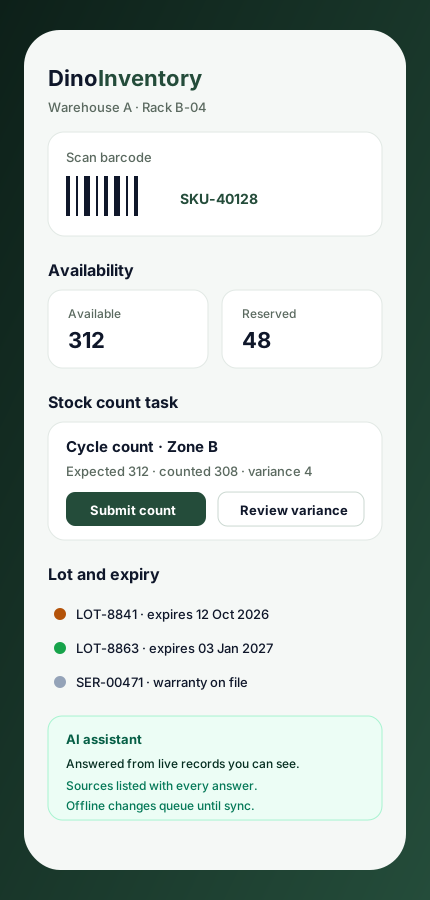
- Scan a barcode to identify stock and move into the relevant inventory task
- Work an assigned stock count against the frozen snapshot of expected quantities
- Confirm pick lists and packing slips for the quantities actually handled
- Record goods receipts, inspection results and putaway locations
- Dispatch transfers and record what was received at the destination
- Keep working when the network drops; supported changes queue and replay after reconnecting, subject to server validation
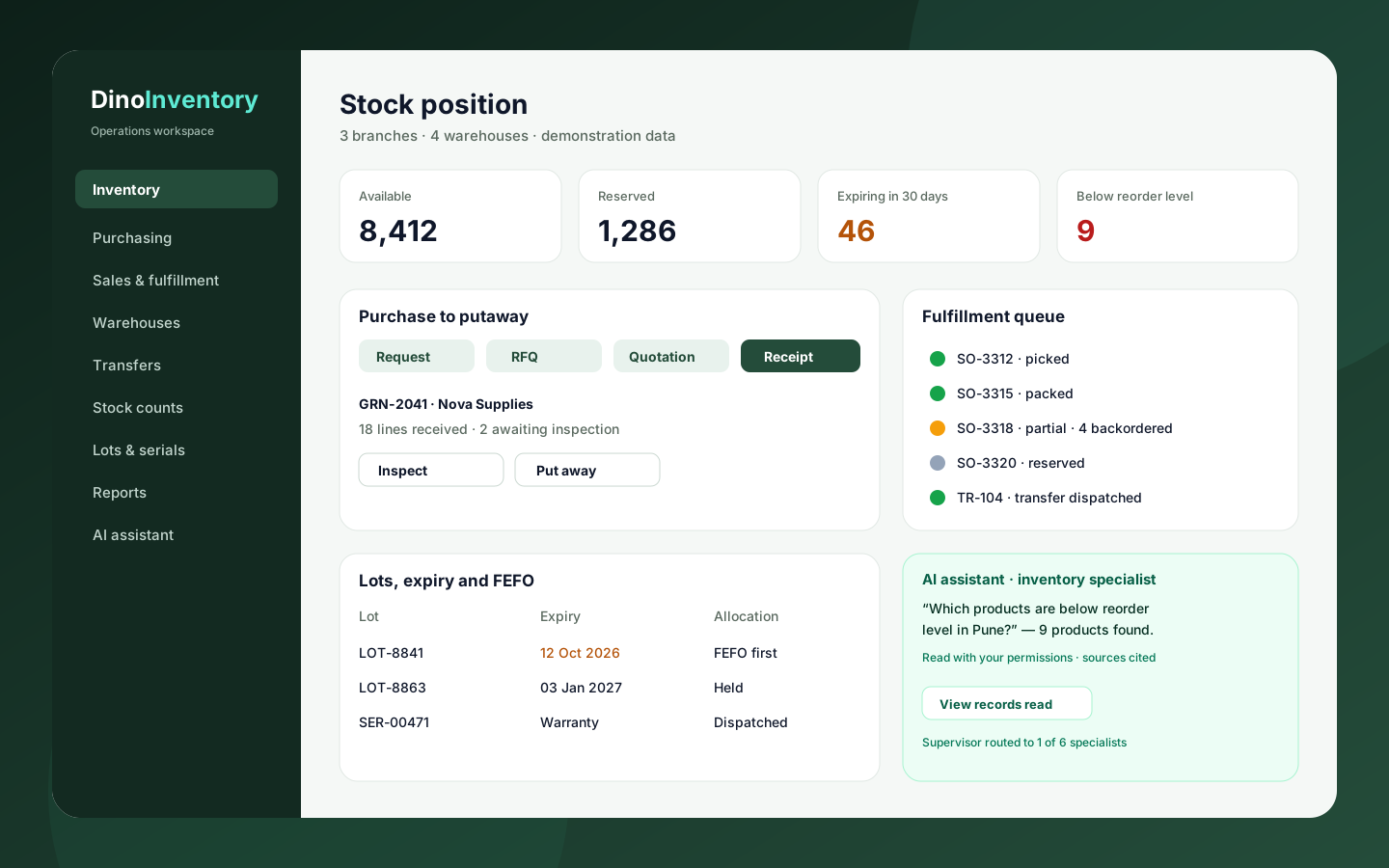
Dino Inventory operations overview
Click any image for a full-resolution preview.
Operations overview illustration, not a live screenshot. Open the live product site for current application screens.
adminOperations overview illustration, not a live screenshot. Open the live product site for current application screens.
Browser interface illustration at a mobile viewport; native Android and iOS applications are not listed as included.
mobileBrowser interface illustration at a mobile viewport; native Android and iOS applications are not listed as included.
How the Application Works
End-to-end workflow across Workspace Administrator, Operations Manager, Purchasing Team, Warehouse Team, Assigned Stock Counter, Custom roles with branch and warehouse scope defined by the administrator.
Request and approve what needs to be purchased
Step 1Compare supplier quotations and place the purchase order
Step 2Receive, inspect and put away the goods that actually arrived
Step 3Reserve stock against sales orders, by earliest expiry where lots apply
Step 4Pick, pack and dispatch shipments while backorders stay visible
Step 5Transfer, count and adjust so balances reconcile to the ledger
Step 6Review reports and audit history, or ask the AI assistant and check its sources
Step 7Dino Inventory roles, modules and integrations
User roles
Workspace Administrator, Operations Manager, Purchasing Team, Warehouse Team, Assigned Stock Counter, Custom roles with branch and warehouse scope defined by the administrator
Modules
Inventory Control, Balances & Ledger, Purchasing, RFQs, Receiving & Inspection, Sales Reservations, Picking, Packing & Shipments, Branches, Warehouses, Locations & Transfers, Stock Counts, Variances & Adjustments, Lots, Expiry, FEFO, Recalls & Serial History, Products, Suppliers, Customers & Barcode Scanning, Reports, Drilldowns & Saved Views, AI Assistant with Six Domain Specialists, AI Provider & Per-Capability Model Configuration, Notifications, Background Jobs & Offline Queue, Users, Roles, Warehouse Scope & Audit History
Integrations
AI model provider connected with your own key, with models chosen per capability, Qdrant vector search for policies, procedures, product, partner and lot records, Speech and transcription model slots configured alongside chat, embeddings and reranking, Barcode scanning workflows for identifying stock inside the workspace, Event notifications and scheduled background jobs such as expiry scans, Accounting, e-commerce, carrier or ERP connections scoped separately
Reports
Live Inventory Summary by Warehouse, Inventory Ledger Movement Drilldown, Available, Reserved and In-Transit Balances, Expiry and Lot Alert Report, Backorder and Outstanding Demand Report, Warehouse Transfer and Discrepancy Report, Saved Report Views Held Against Your Account
Integration scope
- AI model provider connected with your own key, primary plus backup per capability · configuration
- Qdrant vector search for policy and procedure indexing and record search · built in
- Speech and transcription model slots configured per capability · configuration
- Barcode scanning workspace for stock identification · built in
- Event notifications and scheduled background jobs such as expiry scans · built in
- Accounting, e-commerce, carrier or ERP system connections · custom
Purchasing Team
- Capture purchase requests and submit them for approval
- Issue RFQs and compare supplier quotations before ordering
- Record goods receipts and separate failed quantities at inspection
- Complete putaway or raise a purchase return to the supplier
Warehouse Team
- Approve and dispatch warehouse transfers
- Record partial receipts and discrepancy records at the destination
- Assign stock counts against a frozen expected-quantity snapshot
- Review variances before posting the adjustment and ledger movement
Warehouse Team (Fulfillment)
- Reserve available stock against a sales order
- Create pick lists and confirm picked quantities
- Complete packing slips and dispatch shipments
- Keep backordered quantities visible until stock arrives
Operations Manager & Administrator
- Drill from inventory summaries into ledger, expiry, backorder and transfer records
- Assign roles and branch or warehouse scope to each team member
- Review approval decisions and recorded audit activity
- Ask the assistant a question and follow the records it cites
What You Receive
- Operations web application and public site source code for the agreed scope
- Node API service source code
- MySQL database schema and migration files
- Supervisor and six specialist agent workflows
- Backup, restore and verification scripts for the data stores
- Setup and deployment documentation
- Complete source code for the applications and modules in the agreed purchase scope
- Frontend application source code
- Backend API source code
- Admin dashboard source code
- Database schema and migration files
- Application setup documentation
- Environment configuration guidance
- White-label branding support
- Basic deployment assistance
- Server and database migration assistance
- 3 months of technical support
After purchase, you receive the complete source code for the agreed project scope. Branding, basic setup, deployment and migration assistance are included as agreed. A standard branded setup is estimated at approximately 2 weeks after required assets and access are confirmed, subject to the written schedule and third-party dependencies. Three months of technical support starts on the confirmed delivery date.
Deployment and Migration Support
TechDino provides basic migration and deployment assistance to help move the application to the customer's server, VPS, cloud hosting or supported hosting environment. This includes environment setup guidance, database migration, application build guidance and basic deployment verification.
What migration support does not cover
- Hosting fees are not included
- Domain charges are not included
- Paid third-party APIs are not included
- SMS, email, maps and payment-gateway charges are not included
- Major server architecture changes are quoted separately
- New features and large customizations are not included in migration support
Three Months Technical Support Included
Every TechDino project includes three months of technical support from the confirmed delivery date. This support covers installation guidance, deployment-related assistance, configuration help, clarification of the existing codebase and correction of verified issues within the delivered project scope.
Support includes
- Installation guidance
- Environment configuration help
- Deployment clarification
- Database migration clarification
- Existing-feature usage guidance
- Verified bug fixes within the delivered scope
- Basic codebase clarification
- Build and release guidance
Support does not include
- New modules
- New business workflows
- Major UI redesigns
- Third-party service fees
- New third-party integrations
- Infrastructure or hosting costs
- Continuous server administration
- Changes outside the original agreed scope
Additional development, custom features and support after the included three-month period can be provided under a separate support or development agreement.
Source Code and Customization
The customer receives the complete source code included in the agreed product scope. The application can be deployed under the customer's brand, domain and hosting environment. The customer can maintain, extend and customize the delivered application according to the applicable purchase or licence agreement.
Scope for Dino Inventory: Applicable source code for the operations web application, the public site it shares, the Node API service, the MySQL schema and migrations, the supervisor and six specialist agent workflows, and setup documentation included in the agreed purchase scope. Licence type: Commercial License / Software Grant.
Usage, copyright and resale termsDino Inventory by market
Dino Inventory is client-hosted, so each deployment can be scoped around the buyer's currency, timezone, payment providers, data-hosting preference and local integration requirements. These market notes describe planning considerations, not a local office or completed client claim.
- India & HyderabadFor Indian distributors, wholesalers and multi-branch retailers, confirm INR quotations, GST or tax fields, timezone, preferred hosting location and any accounting, notification or barcode-hardware requirement in the agreed scope. Delivered remotely from Hyderabad.Review market requirements
- UAE & GulfFor UAE and Gulf stockrooms and distribution branches, confirm AED billing, branch and warehouse terminology, language, timezone and the country the data is hosted in. Arabic interfaces and new integrations are scoped separately when not already included.Review market requirements
- USA, UK & GlobalFor global deployments, align currency, timezone, unit and SKU conventions, data-hosting country and which AI provider and models the workspace may use with the product configuration before implementation.Review market requirements
Technology and Architecture
Technology stack
- Next.js and React, with the workspace and public site sharing one server-rendered application
- Node API service over a MySQL relational schema where the inventory ledger is the source of truth
- Multi-agent supervisor routing to six domain specialists that call the same API endpoints as the interface
- Qdrant vector search so policies and procedures are searched by meaning and cited by document title
- Provider-agnostic AI: models chosen per capability with a backup, and provider keys encrypted at rest
- Containerized stack deployed to a client-controlled server; hosting, TLS, mail delivery and AI provider credentials remain operator decisions
Deployment options
- Client-controlled VPS or cloud server running the containerized stack
- Custom domain with TLS certificate configured during deployment
- Environment setup with MySQL and Qdrant provisioning, mail delivery credentials and migration assistance
Data migration covered
- Product catalogue with SKUs, categories, brands, units and reorder levels
- Supplier and customer partner records
- Branch, warehouse and storage-location structure
- Opening stock balances with lot, expiry and serial records where tracked
- Import validation and ledger reconciliation before the production cutover
Dino Inventory is fully customizable to your brand
Nothing ships carrying the TechDino name. Every surface a customer or staff member sees is rebranded to your business before handover, and because the source code is yours, your own team can change anything afterwards.
- Business name, logo and app icons
- Brand colour palette and typography
- Your own domain and SSL certificate
- Login, email and notification templates
- Invoice, receipt and report branding
- App-store listing assets under your developer account
- Content, labels and terminology for your market
- Currency, timezone, tax and language settings
White-label options specific to Dino Inventory
- Workspace name, logo and application identity
- Custom domain with TLS certificate
- Interface terminology for branches, warehouses and workflow statuses
- Branded pick lists and packing slips
- White-labeled AI assistant name and help copy
- Workspace name, logo, colours and interface terminology
- Branch, warehouse and storage-location hierarchy
- Roles, branch and warehouse scope, and approval steps in purchasing, transfers, adjustments and counts
- Product fields, categories, brands, units, reorder levels and lot or serial tracking preferences
- AI provider key and per-capability primary and backup model selection
- Policy and procedure documents indexed for the policy specialist
- Notification and background-job setup applied at deployment, including the expiry scan
Transform Dino Inventory into Your Brand
Toggle between our base demo branding and a customized client launch build.
Theme Colors
Custom Corporate Palette
Domain & SSL
Client Custom Domain
App Stores
Published Under Your Account
What business owners get
- Source-code handover for the agreed inventory operations scope
- One shared record set behind purchasing, warehouse work, fulfillment and reporting
- AI answers drawn from live records under the asker's own permissions, with sources shown
- Your own AI provider and models, swapped per capability without touching the rest of the application
- Client-controlled deployment without a mandatory monthly software fee
- Explicit approval steps and audit history across purchasing, transfers, counts and adjustments
How TechDino Compares to Alternative Software Delivery Models
Evaluating ready-made software against custom development from scratch or recurring monthly SaaS subscriptions.
Ready-Made Dino Inventory
- Timeline: 2-Week Setup Estimate; final schedule confirmed after scope review
- Pricing: One-time quotation per agreed scope
- Code Access: Full source-code handover included
- Hosting: Self-hosted on client VPS (Hostinger, AWS, DigitalOcean)
- Software Fees: 0 recurring platform fees
Development From Scratch
- Timeline: Onboarding varies by vendor and scope
- Pricing: Agency quotes vary with scope; compare the written quotation you receive
- Code Access: Handed over upon project sign-off
- Hosting: Cloud infrastructure setup
- Risks: Scope changes, milestone delays, untested edge cases
Rental Subscriptions
- Timeline: Onboarding varies by vendor and scope
- Pricing: Compare actual subscription and usage charges
- Code Access: Check the vendor’s source and export terms
- Hosting: Check available hosting and residency options
- Customization: Compare supported extensions and APIs
Global Deployment, Currency & Invoicing Support
Delivery is coordinated remotely from Hyderabad. Currency, language, hosting and payment requirements are reviewed against this product’s included scope.
Scope INR billing, tax fields, gateway credentials and India hosting requirements for this product. Only the integrations listed in the agreed scope are included.
India Market DetailsReview USD/CAD billing, payment-provider eligibility and your preferred hosting country. Gateway and infrastructure choices depend on the product and agreed scope.
USA Market DetailsConfirm AED/SAR billing, language requirements, supported gateways and the exact hosting country. Arabic interfaces and new integrations are separately scoped where not included.
UAE Market DetailsReview GBP/EUR billing, payment providers, export needs and the required hosting country. Hosting alone does not establish regulatory compliance.
UK Market DetailsConfirm AUD/SGD billing, gateway availability and your required hosting country. Payment and deployment options are reviewed for the actual application.
Australia Market DetailsExplore target markets and discuss payment, tax, timezone and hosting requirements for your deployment.
Dino Inventory frequently asked questions
What is Dino Inventory?
Dino Inventory is an AI-native inventory operations application from TechDino for businesses that buy, store, move and ship physical stock. One workspace holds products, purchasing, sales fulfillment, branches, warehouses, storage locations, transfers, stock counts, lot and serial traceability, reporting and a multi-agent AI assistant that reads live records under the signed-in user's own permissions.
How is Dino Inventory different from Dino WMS?
Dino Inventory is stock control across branches; Dino WMS is execution inside a warehouse. Dino Inventory starts earlier — purchase requests, RFQs and supplier quotations — and adds FEFO allocation, recalls, backorders and frozen-snapshot stock counts. Dino WMS goes deeper into the building with zones, aisles, bins, pallets, putaway strategies and 3PL workflows. Distributors running multi-branch stock choose Dino Inventory; a single large warehouse or a 3PL operator choose Dino WMS.
Which inventory workflows does Dino Inventory cover?
Dino Inventory covers four connected chains: purchasing, sales fulfillment, warehouse movement and traceability. Purchasing runs purchase requests, RFQs, supplier quotations, purchase orders, goods receipts, quality inspection, putaway and purchase returns. Fulfillment runs reservations, picking, packing, shipments and backorders. Movement covers branches, warehouses, storage locations, transfers with partial receipts and discrepancies, and assigned stock counts with variance review. Traceability covers lots, expiry, FEFO, recalls and serial history, with reports, saved views, notifications, search and audit history throughout.
How does the Dino Inventory AI assistant work?
A supervisor agent routes each question to one of six domain specialists — inventory and warehouse, procurement, sales and CRM, finance, manufacturing or policy — so a stock-ledger question is not answered from a picking record. Each specialist calls the same API endpoints the interface calls, and the tool calls and records it read stay visible beside the answer, so you can check the working.
Can the AI assistant see data a user is not allowed to see?
No. The assistant reads each record with the signed-in user's own credentials, so role, branch and warehouse scope limit it exactly as they limit the interface. It keeps no separate copy of your operations and carries no elevated access, so an answer can only be as current and as permitted as the screen the person asking is already allowed to open.
Does Dino Inventory support multiple warehouses and branches?
Yes. The application models branches, warehouses and storage locations, and scopes each user's access to the ones their role covers. Stock balances stay separated by warehouse rather than pooled, and moving stock between sites runs through a transfer with approval, dispatch and receipt records. Movements inside a single warehouse are handled as location transfers.
Does Dino Inventory handle partial fulfillment and backorders?
Yes. Sales orders can reserve only the quantity available at the fulfilling warehouse, then progress through pick lists, packing slips and shipments for the quantities actually handled. Outstanding demand stays visible as a backorder instead of the order being treated as complete, and it can be reserved and shipped again once replenishment arrives. Transfers likewise record partial receipts and discrepancies.
Can Dino Inventory track lots, expiry dates, serial numbers and recalls?
Yes. Lot records carry lot numbers, warehouse, available quantity and expiry dates, and FEFO allocation prioritises eligible stock with the earliest expiry while excluding expired and recalled lots. Expiry alerts surface batches that need a decision, recalls are recorded against the lot, and serial records keep each unit's location, history and warranty reference for later investigation.
Which AI models and providers does Dino Inventory run on?
Whichever you connect. An operator adds their own provider key once, then chooses models per capability — chat, embeddings, reranking, speech and transcription — with a backup model for each slot, so a refusal or provider error falls through instead of failing the conversation. Free and paid models are listed with their pricing. Provider keys are encrypted before storage and shown only by their last four characters.
Can staff scan barcodes, and what happens when the connection drops?
Yes, and queued offline changes replay when the connection returns. The application includes a scanning workspace for identifying stock by barcode and moving straight into the relevant inventory task, plus search across product, partner and lot records. When a request cannot reach the server, supported changes are queued locally and replayed after the connection returns. Replay is not automatic acceptance: each queued change still needs valid access and must pass the server's current business rules, so failures are flagged for review.
What reporting does Dino Inventory provide, and can report views be saved?
Yes, report filters and column selections save to your account. Live inventory summaries drill down into the inventory, ledger, expiry, backorder and transfer records behind each total, so a number can be followed to the rows that produced it. Expiry, backorder and transfer reports are meant for finding the records that need follow-up, and a saved view keeps its filters and selected columns for the review you run every week.
Can Indian and Hyderabad businesses use Dino Inventory?
Yes. Dino Inventory can be scoped for Indian distribution, wholesale and multi-branch retail operations, including INR quotations, any GST or tax fields added as scoped work, timezone, local hosting preference and the notification or accounting integrations you need. It is delivered remotely from Hyderabad by TechDino, and the written scope confirms the configuration, the data to be imported and anything quoted separately.
Can Dino Inventory be configured for UAE or global operations?
Yes. UAE, Gulf and international deployments review currency, timezone, language, branch and warehouse terminology, the country the data is hosted in, and which AI provider is acceptable, before implementation. Arabic interfaces, new integrations and regulatory or accounting work are separate scope items unless the written agreement includes them. The application itself is browser-based, so distributed branches work from the same records.
Is Dino Inventory delivered white-labeled with source code, and how long does setup take?
Yes. TechDino applies your name, logo, colours, domain, terminology and document branding, then assists with deployment on infrastructure you control. Applicable source code for the agreed scope, the database schema and setup documentation are included, with permitted use defined in the written commercial agreement. A standard branded setup is estimated at approximately two weeks after scope, brand assets, hosting access and required provider credentials are confirmed; three months of technical support starts at delivery.
Is migration support included?
Yes. Basic setup, deployment and database migration assistance is included for moving the application to a supported hosting environment.
How much technical support is included?
Three months of technical support is included from the confirmed project delivery date.
Are hosting and third-party charges included?
No. Hosting, domain registration, SMS, email, maps, payment gateways and other paid third-party services are separate.
Can I request new features?
Yes. New features and major customizations can be developed under a separate quotation based on the required scope.
Is pricing published?
No. Every purchase is quoted on scope: product, branding, deployment target, integrations and customisation. Share your requirement on WhatsApp or the contact form and TechDino returns a written quotation after a walkthrough.
Is a mobile application included?
Dino Inventory ships as a web and progressive web application. Native mobile builds are an optional add-on quoted separately, so mobile source code is delivered only when the agreed package includes it.
Related products and resources
Dino WMS
Dino WMS — AI-Powered Warehouse Management System
View productDino Business OS
Dino Business OS — AI-Powered Business Operations Software
View productDino VMS
White-Label Vendor Management System
View productDinoFleet
DinoFleet — AI-Powered Fleet Management Software
View productGuides for Dino Inventory
AI-Native Inventory Management Software: Purchase-to-Dispatch, FEFO & Permission-Scoped AI
An architectural guide to Dino Inventory: branch-wide stock control from purchase requisitions and RFQs to frozen-snapshot stock counts, FEFO lot allocation, Qdrant policy search, and a six-specialist AI assistant.
Read the guideMulti-Location Inventory Management Software: Real-Time Stock Sync & Batch Tracking
Discover how self-hosted multi-location inventory management software tracks stock balances, batch expiry dates, and automated purchase orders across warehouse networks.
Read the guideCustom B2B Inventory and Order Management Software for Canadian Distributors
Architecting B2B inventory and wholesale distribution software in Canada: provincial GST/PST/HST tax rules, multi-warehouse logistics, and PIPEDA data privacy.
Read the guideDeploy Dino Inventory under your brand
Source code for the agreed scope, migration assistance and three months of technical support, delivered by TechDino.
Or Chat Directly on WhatsAppRequest a Dino Inventory Walkthrough
Tell us what you want to launch. Prepare a WhatsApp message for Nayesh. Response time depends on availability.