
Dino WMS — AI-Powered Warehouse Management System
Dino WMS — AI-Powered Warehouse Management System
AI-powered warehouse management software for products, stock, warehouses, purchasing, receipts, picking, packing, dispatch, transfers, traceability and operational reporting.
Built for: Warehousing & Distribution, Wholesale & Supply Chain, Retail & Ecommerce, 3PL & Logistics Operations
- Complete Source Code
- Fully Brand-Customizable
- 2-Week Setup Estimate
- Migration Assistance
- 3 Months Support
Complete source code
Frontend, backend, admin dashboard and database schema for the agreed scope — handed to you, not rented.
Fully customizable to your brand
Business name, logo and app icons, Brand colour palette and typography, Your own domain and SSL certificate, Login, email and notification templates and more — applied before handover.
2-Week Setup Estimate
A standard branded deployment is estimated at approximately 2 weeks after the scope, brand assets, hosting access and required service credentials are confirmed. The estimate covers agreed branding, environment setup, supported integration configuration, supplied-data migration, testing and handover. Actual timing depends on product scope, data readiness, client approvals and third-party dependencies. Custom modules and new integrations are quoted separately; the written project schedule governs delivery.
Dino WMS is an AI-powered, browser-based warehouse management system for distributors, wholesalers, retailers, manufacturers and 3PL teams. It connects product catalogues, warehouses, purchasing, receipts, picking, packing, dispatch, transfers, traceability and reporting, while its permission-scoped AI assistant answers from permitted records and prepares changes for review. Buyers receive complete source code, white-label branding, deployment and migration assistance, plus three months of technical support. Standard setup is estimated at approximately 2 weeks.
What is Dino WMS?
- Launch window
- 14 days for a standard branded deployment
- Tenancy model
- Single business (one organisation per deployment)
- Source code
- Included — Commercial License / Software Grant
- Deployment
- Client-controlled VPS or cloud server, Custom domain with SSL, Environment setup and database migration assistance
Dino WMS is a ready-made, white-label warehouse management system for distributors, wholesalers, retailers, manufacturers, 3PL teams and businesses operating one or more warehouses. The live product covers the operational chain from product catalogue and units through suppliers, purchase orders, goods receipts, putaway, stock balances, ledger entries, moves, transfers, adjustments, cycle counts, reservations, pallet handling, sales orders, picking, packing, shipments and returns. Batch, expiry and serial traceability, quality inspection, alerts, approvals, reports and a searchable audit log keep warehouse activity visible across the team. Its Dino AI Assistant is a permission-scoped warehouse copilot: it can answer questions from the warehouse records and knowledge base a user is allowed to see, generate operational briefings and prepare changes for review. The product is delivered as a responsive browser application with administrative and staff workflows, role-based access and a backend API for the agreed scope. It can be branded with the buyer's identity and deployed on client-controlled infrastructure. Barcode and QR workflows support camera scanning, while USB and Bluetooth scanners can work through keyboard input. Hosting, AI provider usage, integrations and any new workflows are confirmed in the written project scope.
Distributors, wholesalers, retailers, manufacturers, 3PL operators and warehouse teams in India, Hyderabad, the UAE and global markets that need connected stock, procurement and dispatch records with an AI operations copilot.
How can you buy Dino WMS?
Dino WMS with source code
Dino WMS is delivered with the complete source code included in the agreed product scope — frontend, backend, admin dashboard, database schema and any applicable mobile application code. Source-code access, licensing rights and ownership terms are set out in the applicable purchase or licence agreement, so the delivered application can be maintained and extended by your own team.
Source-code access, copyright and licensing rightsSelf-hosted Dino WMS
Dino WMS runs on hosting you control — your own VPS, cloud account or existing infrastructure — rather than on a vendor platform. Deployment, database setup and migration assistance are included, and there is no mandatory monthly platform fee attached to the software itself. Third-party services such as payment gateways, SMS providers and hosting are billed by those providers directly.
Self-hosted deployment optionsWhite-label Dino WMS
Dino WMS can use your name, logo, colour scheme, domain and applicable templates; app-store assets apply where a mobile application is in scope. A standard branded deployment is estimated in approximately 2 weeks after scope and required assets are confirmed, subject to client approvals, data readiness, third-party dependencies and the written schedule.
What white-label customization coversDino WMS for agencies and resellers
Agencies, studios and IT partners can take Dino WMS to their own clients under their own brand. Licensing terms for reselling, the number of deployments permitted and any ongoing support arrangement are defined in the applicable agreement before the engagement starts.
Reseller and partner arrangementsApplications Included
Dino WMS is delivered as the 5 applications below. Each one is part of the purchase scope.
- Warehouse managers, inventory teams, procurement staff and dispatch operators in any browser01
Warehouse Operations Web Application
- Review stock by warehouse, location, batch and serial
- Process purchasing, receiving, picking, packing and dispatch
- Scan barcode or QR values with camera or scanner input
- Ask the permission-scoped Dino AI Assistant about warehouse records
- The business owner and back-office team02
Admin Dashboard
- Warehouse, location, zone and bin configuration
- Product catalogue, categories, brands, units and custom fields
- Supplier, customer and partner records
- AI provider, model, knowledge base and usage configuration
- Approval rules, alerts, role permissions and audit history
- Reports, exports and operational settings
- Staff members handling day-to-day operations03
Staff Portal
- Role-specific access and workflows are confirmed in the agreed product scope
- The applications above, and any system you integrate later04
Backend REST API
- REST endpoints used by the web and admin applications
- Authentication and session handling
- Role and permission checks
- Endpoints for the integrations configured during setup
- Your server or managed database instance05
Database
- Database schema for every module listed above
- Migration files used during setup
- Reference data required for first run
Branding and setup plan for Dino WMS
A standard branded deployment is estimated at approximately 2 weeks after the scope, brand assets, hosting access and required service credentials are confirmed. The estimate covers agreed branding, environment setup, supported integration configuration, supplied-data migration, testing and handover. Actual timing depends on product scope, data readiness, client approvals and third-party dependencies. Custom modules and new integrations are quoted separately; the written project schedule governs delivery.
- Day 1–2
1. Requirements and brand assets
Scope confirmation, logo, colour palette, domain, company details and the integration credentials you want configured.
- Day 3–6
2. White-label branding applied
Brand identity, theme colours, typography, app icons, email and notification templates applied across every included interface.
- Day 7–10
3. Deployment and integrations
Server or cloud deployment, domain and SSL, database setup, payment gateway, SMS, email and maps configuration.
- Day 11–14
4. Migration, testing and handover
Migration of supplied data, walkthrough testing, source-code handover, documentation and admin training. Three months of technical support starts here.
Who can use Dino WMS?
- Distributors & Wholesalers: Manage product catalogues, supplier receipts, branch stock, customer orders and dispatch from one system.
- Retail & Ecommerce Operations: Keep central warehouse stock, reservations, picking, packing and shipment status aligned with sales demand.
- Manufacturers & Assembly Teams: Track received materials, warehouse locations, serialised items, quality checks and stock movement records.
- 3PL & Logistics Teams: Organize warehouses, locations, pallets, reservations and auditable movements for day-to-day fulfilment operations.
- Multi-Warehouse Businesses: Compare stock positions, transfer inventory between sites and review warehouse-level reports with role-scoped access.
- Software Agencies & Resellers: Rebrand and deploy a warehouse management product under a client's company identity, subject to the written licence.
Problems Dino WMS solves
Stock balances split across spreadsheets, disconnected systems and warehouse notebooks.
No single view of product, location, batch, serial and warehouse availability.
Purchase receipts, sales dispatch and internal stock movements recorded in separate workflows.
Low-stock, expiry, quality and cycle-count follow-up handled manually.
Warehouse teams unable to ask operational questions without searching several reports.
AI tools that lack permission-scoped access and a review step for proposed changes.
What changes with Dino WMS
Before
- Stock, receipts and dispatch tracked in disconnected spreadsheets
- No shared view of warehouse locations, batches or serials
- Manual low-stock, expiry and cycle-count follow-up
- Operational questions require searching several reports
- AI access rules and proposed actions are unclear
After
- Products, warehouses, purchasing, inventory and dispatch share one workflow
- Location, batch, expiry, serial, pallet and reservation records stay traceable
- Alerts, approvals, reports and cycle-count queues make follow-up visible
- Dino AI answers permitted warehouse questions with a reviewable context
- AI-prepared changes remain subject to workflow approval and audit history
Application Features
Every module below ships pre-built and is configurable during white-label setup.
Product Catalogue & Units
Manage products, categories, brands, units, custom fields, barcodes and the catalogue data used throughout warehouse workflows.
Warehouses & Locations
Model warehouses and their locations, then use putaway, availability and movement workflows to keep stock where it belongs.
Purchasing & Receiving
Create purchase orders, capture supplier details and post goods receipts against the expected inbound stock.
Inventory Control
Review balances and ledger history, move stock, process adjustments, run cycle counts and monitor reorder levels.
Sales, Picking & Dispatch
Carry confirmed sales orders through allocation, picking, packing, shipments and customer returns.
Traceability & Quality
Track batches, expiry dates, serial numbers, pallets, reservations, inspections and returns across the stock lifecycle.
Reports & Governance
Use operational reports, alerts, approvals and a searchable audit log to keep decisions reviewable.
Dino AI Assistant
Ask permission-scoped questions about stock, orders, reports and SOPs; generate insights and prepare changes for human review.
Admin panel capabilities
- Warehouse, location, zone and bin configuration
- Product catalogue, categories, brands, units and custom fields
- Supplier, customer and partner records
- AI provider, model, knowledge base and usage configuration
- Approval rules, alerts, role permissions and audit history
- Reports, exports and operational settings
Warehouse Operator Features
- Warehouse and location stock views
- Purchase order and goods receipt processing
- Sales order, picking, packing and shipment queues
- Stock transfers, adjustments and cycle counts
- Batch, expiry, serial, pallet and reservation lookups
- Dino AI Assistant for permitted warehouse questions
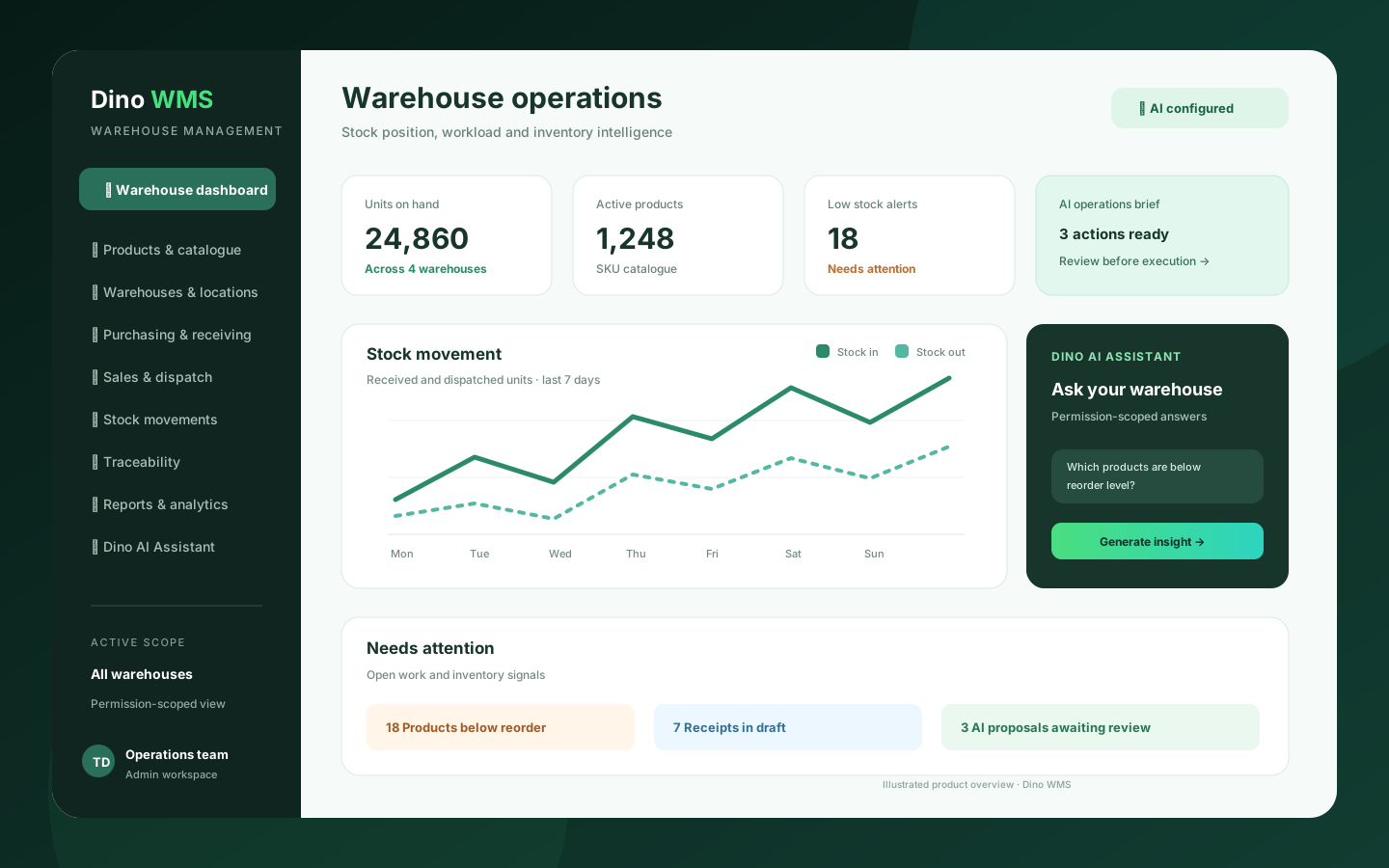
Dino WMS warehouse operations overview
Click any image for a full-resolution preview.
Warehouse operations overview illustration. Explore the live demo for current application screens.
adminWarehouse operations overview illustration. Explore the live demo for current application screens.
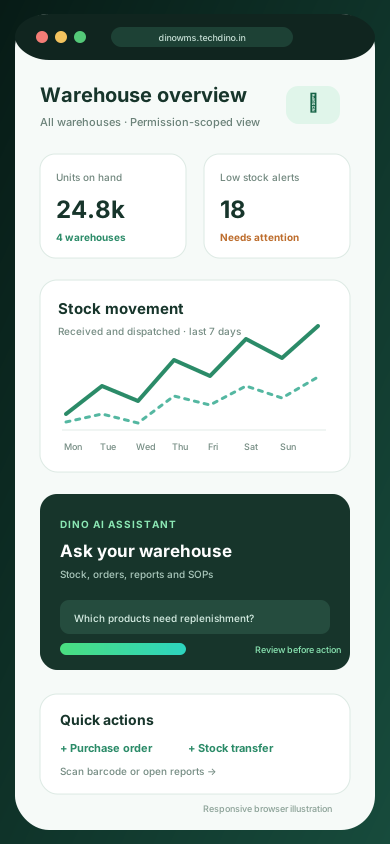
Responsive browser workflow illustration; native Android and iOS applications are not listed as included.
mobileResponsive browser workflow illustration; native Android and iOS applications are not listed as included.
How the Application Works
End-to-end workflow across Administrator, Warehouse Manager, Inventory Controller, Procurement Officer, Dispatch Operator, Auditor.
Catalogue products, units and warehouse locations
Step 1Raise a purchase order and post the goods receipt
Step 2Put stock away and review warehouse availability
Step 3Confirm sales orders and move them through picking and packing
Step 4Dispatch the shipment and retain the stock ledger trail
Step 5Review transfers, counts, returns, quality and traceability reports
Step 6Ask Dino AI for a permission-scoped briefing or a change proposal for review
Step 7Dino WMS roles, modules and integrations
User roles
Administrator, Warehouse Manager, Inventory Controller, Procurement Officer, Dispatch Operator, Auditor
Modules
Product Catalogue, Categories, Brands & Units, Warehouses, Locations & Putaway, Suppliers & Customers, Purchase Orders & Goods Receipts, Sales Orders, Picking, Packing & Shipments, Stock Balances, Ledger & Movement, Transfers, Adjustments & Cycle Counts, Pallets, Reservations & Availability, Batches, Expiry & Serial Traceability, Quality Inspection & Returns, Reports, Alerts & Approvals, Audit Log & Dino AI Assistant, AI Actions, Knowledge Base & Usage
Integrations
OpenRouter or another approved AI provider configured in the application, Camera barcode and QR scanning, USB / Bluetooth barcode scanners through keyboard input, Spreadsheet bulk import and export
Reports
Stock Balances by Warehouse and Location, Stock Ledger and Movement History, Low Stock and Reorder Review, Purchase Order and Goods Receipt Status, Sales Order, Picking and Shipment Status, Inventory by Batch, Expiry and Serial, Warehouse Valuation and Stock Distribution, Quality Inspection and Returns Summary, Operational Reports and Audit History, AI Insight and Usage Review
Integration scope
- OpenRouter / approved AI provider · configuration
- Camera barcode and QR scanning · built in
- USB / Bluetooth barcode scanner · built in
- Spreadsheet import / export · built in
- ERP, accounting and courier APIs · custom
Administrator
- Configure warehouses and locations
- Manage users, permissions and approvals
- Set up AI providers and knowledge sources
- Review audit logs and usage
Warehouse Manager
- Review stock by warehouse and location
- Monitor receiving, picking and dispatch queues
- Approve operational requests
- Review warehouse reports
Inventory Controller
- Process moves, transfers and adjustments
- Run cycle counts
- Track batches, expiry and serials
- Investigate ledger history
Procurement & Dispatch Teams
- Raise purchase orders and receive goods
- Process sales orders, picking and packing
- Record shipments and returns
- Ask the AI assistant about permitted records
What You Receive
- Responsive warehouse web application source code
- Backend API source code for the agreed scope
- Database schema and migration files
- AI assistant and knowledge-base configuration included in scope
- Setup and deployment documentation
- Complete source code for the applications and modules in the agreed purchase scope
- Frontend application source code
- Backend API source code
- Admin dashboard source code
- Application setup documentation
- Environment configuration guidance
- White-label branding support
- Basic deployment assistance
- Server and database migration assistance
- 3 months of technical support
After purchase, you receive the complete source code for the agreed project scope. Branding, basic setup, deployment and migration assistance are included as agreed. A standard branded setup is estimated at approximately 2 weeks after required assets and access are confirmed, subject to the written schedule and third-party dependencies. Three months of technical support starts on the confirmed delivery date.
Deployment and Migration Support
TechDino provides basic migration and deployment assistance to help move the application to the customer's server, VPS, cloud hosting or supported hosting environment. This includes environment setup guidance, database migration, application build guidance and basic deployment verification.
What migration support does not cover
- Hosting fees are not included
- Domain charges are not included
- Paid third-party APIs are not included
- SMS, email, maps and payment-gateway charges are not included
- Major server architecture changes are quoted separately
- New features and large customizations are not included in migration support
Three Months Technical Support Included
Every TechDino project includes three months of technical support from the confirmed delivery date. This support covers installation guidance, deployment-related assistance, configuration help, clarification of the existing codebase and correction of verified issues within the delivered project scope.
Support includes
- Installation guidance
- Environment configuration help
- Deployment clarification
- Database migration clarification
- Existing-feature usage guidance
- Verified bug fixes within the delivered scope
- Basic codebase clarification
- Build and release guidance
Support does not include
- New modules
- New business workflows
- Major UI redesigns
- Third-party service fees
- New third-party integrations
- Infrastructure or hosting costs
- Continuous server administration
- Changes outside the original agreed scope
Additional development, custom features and support after the included three-month period can be provided under a separate support or development agreement.
Source Code and Customization
The customer receives the complete source code included in the agreed product scope. The application can be deployed under the customer's brand, domain and hosting environment. The customer can maintain, extend and customize the delivered application according to the applicable purchase or licence agreement.
Scope for Dino WMS: Applicable source code for the responsive web application, backend API, database schema, migrations, AI workflows and setup documentation included in the agreed purchase scope. Licence type: Commercial License / Software Grant.
Usage, copyright and resale termsDino WMS by market
Dino WMS is client-hosted, so each deployment can be scoped around the buyer's currency, timezone, payment providers, data-hosting preference and local integration requirements. These market notes describe planning considerations, not a local office or completed client claim.
- India & HyderabadFor Indian distributors and warehouse teams, review INR quotations, GST or tax-field requirements, local hosting preferences and any barcode, ERP or communication integration needed for the agreed scope.Review market requirements
- UAE & GulfFor UAE and Gulf operators, confirm AED billing, warehouse terminology, timezone, language and hosting requirements. Arabic interfaces and new integrations are scoped separately when not already included.Review market requirements
- USA, UK & GlobalFor global deployments, align currency, timezone, warehouse processes, data-hosting country and AI-provider requirements with the product configuration before implementation.Review market requirements
Technology and Architecture
Technology stack
- Responsive browser-based warehouse application
- Role-based access with permission-scoped AI retrieval
- Human-reviewed AI action proposals rather than unreviewed execution
- Barcode and QR scanning with camera or USB / Bluetooth keyboard-wedge devices
- Client-controlled VPS or cloud deployment after environment review
- Database and application migration assistance for the agreed import scope
Deployment options
- Client-controlled VPS or cloud server
- Custom domain with SSL
- Environment setup and database migration assistance
Data migration covered
- Product catalogue, categories, brands and units
- Warehouse, location and opening-stock records
- Supplier and customer master data
- Opening balances and agreed historical movement data
- Import validation before the production cutover
Dino WMS is fully customizable to your brand
Nothing ships carrying the TechDino name. Every surface a customer or staff member sees is rebranded to your business before handover, and because the source code is yours, your own team can change anything afterwards.
- Business name, logo and app icons
- Brand colour palette and typography
- Your own domain and SSL certificate
- Login, email and notification templates
- Invoice, receipt and report branding
- App-store listing assets under your developer account
- Content, labels and terminology for your market
- Currency, timezone, tax and language settings
White-label options specific to Dino WMS
- Warehouse brand name, logo and application identity
- Custom domain with SSL certificate
- Branded operational documents and reports
- Custom terminology for warehouse roles and workflows
- White-labeled AI assistant name, prompt labels and help copy
- Company name, logo, colours and interface terminology
- Warehouse, zone, aisle, bin and location hierarchy
- Roles, permissions and approval rules
- Stock, purchasing, receiving and dispatch workflows
- AI provider, model and knowledge-base configuration
- Local currency, timezone, tax labels and document templates
- Product catalogue, supplier and opening-stock import mapping
Transform Dino WMS into Your Brand
Toggle between our base demo branding and a customized client launch build.
Theme Colors
Custom Corporate Palette
Domain & SSL
Client Custom Domain
App Stores
Published Under Your Account
What business owners get
- Full source-code handover for the agreed WMS scope
- AI assistant grounded in permission-scoped warehouse records
- Connected product, purchasing, inventory and dispatch workflows
- Client-controlled deployment without a mandatory monthly software fee
- Warehouse, location, batch and serial traceability in one operational record
- Human review for AI-prepared changes and a searchable audit trail
How TechDino Compares to Alternative Software Delivery Models
Evaluating ready-made software against custom development from scratch or recurring monthly SaaS subscriptions.
Ready-Made Dino WMS
- Timeline: 2-Week Setup Estimate; final schedule confirmed after scope review
- Pricing: One-time quotation per agreed scope
- Code Access: Full source-code handover included
- Hosting: Self-hosted on client VPS (Hostinger, AWS, DigitalOcean)
- Software Fees: 0 recurring platform fees
Development From Scratch
- Timeline: Onboarding varies by vendor and scope
- Pricing: Agency quotes vary with scope; compare the written quotation you receive
- Code Access: Handed over upon project sign-off
- Hosting: Cloud infrastructure setup
- Risks: Scope changes, milestone delays, untested edge cases
Rental Subscriptions
- Timeline: Onboarding varies by vendor and scope
- Pricing: Compare actual subscription and usage charges
- Code Access: Check the vendor’s source and export terms
- Hosting: Check available hosting and residency options
- Customization: Compare supported extensions and APIs
Global Deployment, Currency & Invoicing Support
Delivery is coordinated remotely from Hyderabad. Currency, language, hosting and payment requirements are reviewed against this product’s included scope.
Scope INR billing, tax fields, gateway credentials and India hosting requirements for this product. Only the integrations listed in the agreed scope are included.
India Market DetailsReview USD/CAD billing, payment-provider eligibility and your preferred hosting country. Gateway and infrastructure choices depend on the product and agreed scope.
USA Market DetailsConfirm AED/SAR billing, language requirements, supported gateways and the exact hosting country. Arabic interfaces and new integrations are separately scoped where not included.
UAE Market DetailsReview GBP/EUR billing, payment providers, export needs and the required hosting country. Hosting alone does not establish regulatory compliance.
UK Market DetailsConfirm AUD/SGD billing, gateway availability and your required hosting country. Payment and deployment options are reviewed for the actual application.
Australia Market DetailsExplore target markets and discuss payment, tax, timezone and hosting requirements for your deployment.
Dino WMS frequently asked questions
What is Dino WMS?
Dino WMS is an AI-powered, browser-based warehouse management system from TechDino. It connects product catalogues, warehouses, purchasing, goods receipts, inventory movements, sales dispatch, traceability, reporting and permission-scoped AI assistance in one operational workspace.
Which warehouse workflows does Dino WMS cover?
The live product covers products and units, warehouses and locations, purchase orders, goods receipts, putaway, stock balances and ledger, moves, transfers, adjustments, cycle counts, pallets, reservations, sales orders, picking, packing, shipments, returns, quality inspection and reports.
How does the Dino AI Assistant work in the WMS?
Dino AI Assistant is a multi-agent warehouse copilot that answers questions from the warehouse records and knowledge base a signed-in user is allowed to see. It can prepare briefings and changes for review, while approved workflow screens and human controls remain part of execution.
Can the WMS AI assistant see restricted warehouse data?
The assistant is designed around permission-scoped warehouse access. Questions and retrieval are limited to records the signed-in user can access, and the product should be configured and tested against the buyer's role and warehouse permissions before production use.
Does Dino WMS support multiple warehouses and locations?
Yes. Dino WMS models warehouses and their locations, then supports stock balances, movements, transfers, putaway, pallets and reservations across the operational structure. The number of sites, hierarchy and any branch-specific rules are confirmed during configuration.
Can Dino WMS track batches, expiry dates and serial numbers?
Yes. Batch and expiry tracking, serial number records, traceability views, quality inspection and returns are listed in the live product's navigation and workflow scope. The exact fields and import format are agreed for the implementation.
Can warehouse teams scan barcodes or QR codes?
Yes. The application includes camera barcode or QR scanning, and the live interface also documents USB and Bluetooth barcode scanners that enter values through keyboard-wedge input.
Does Dino WMS connect purchasing to receiving and dispatch?
Yes. Teams can raise purchase orders, record goods receipts, update stock, process sales orders, pick and pack items, create shipments and handle customer or supplier returns within connected warehouse workflows.
Is a mobile app included with Dino WMS?
Dino WMS is supplied as a responsive browser-based application with admin and staff workflows. Native Android and iOS applications are not listed as included; a native mobile requirement can be reviewed and quoted as separate scope.
Can Dino WMS be white-labeled and self-hosted?
Yes. TechDino can apply the buyer's name, logo, colours, domain, terminology and document branding, then assist with deployment on client-controlled infrastructure. Source-code access and permitted use are defined in the written commercial agreement.
Can Indian or Hyderabad warehouse teams use Dino WMS?
Yes. Dino WMS can be scoped for Indian warehouse operations, including INR quotations, GST or tax fields, timezone, local hosting preferences and the integrations required by the business. It is delivered remotely from Hyderabad; the written scope confirms the actual configuration.
Can Dino WMS be configured for UAE or global operations?
Yes. UAE, Gulf and global deployments can review currency, timezone, language, warehouse terminology, hosting country and AI-provider requirements. Arabic interfaces, new integrations and regulatory work are separate scope items unless expressly included.
Is the WMS source code included and how long does setup take?
Applicable source code, database materials and setup documentation are included in the agreed product scope. Standard branded setup is estimated at approximately two weeks after scope, assets, hosting access and required credentials are confirmed; three months of technical support starts at delivery.
Is migration support included?
Yes. Basic setup, deployment and database migration assistance is included for moving the application to a supported hosting environment.
How much technical support is included?
Three months of technical support is included from the confirmed project delivery date.
Are hosting and third-party charges included?
No. Hosting, domain registration, SMS, email, maps, payment gateways and other paid third-party services are separate.
Can I request new features?
Yes. New features and major customizations can be developed under a separate quotation based on the required scope.
Is pricing published?
No. Every purchase is quoted on scope: product, branding, deployment target, integrations and customisation. Share your requirement on WhatsApp or the contact form and TechDino returns a written quotation after a walkthrough.
Related products and resources
Dino Inventory
Dino Inventory — AI-Native Inventory Management Software
View productDino Business OS
Dino Business OS — AI-Powered Business Operations Software
View productDino VMS
White-Label Vendor Management System
View productDino Assets Management
White-Label Asset Management Software & Fixed Asset Register
View productRetailDino SaaS
White-Label Retail POS & Inventory SaaS Platform with Complete Source Code
View productGuides for Dino WMS
Saudi & UAE WMS: Meeting ZATCA Phase 2 E-Invoicing Without Multi-Tenant SaaS Overhead
Wholesalers and 3PL providers in Riyadh and Dubai need WMS platforms compliant with ZATCA Phase 2 and FTA e-invoicing. Self-hosted WMS delivers barcode dispatch and cryptographic invoice signing.
Read the guideMulti-Location WMS: Barcode Scanning, Pallet Tracking, and Self-Hosted Operations
Discover how self-hosted multi-location warehouse management systems handle 2D barcode scanning, bin rack allocation, and eliminate recurring SaaS costs.
Read the guideWarehouse Management System (WMS) for Saudi Arabia and Riyadh Distribution Hubs
Evaluating warehouse management systems in Saudi Arabia: ZATCA Phase 2 e-invoicing compliance, Arabic barcode logistics, and Saudi cloud data residency.
Read the guideWarehouse Management Software for Distributors and Wholesalers: A Practical Buyer's Guide
Which warehouse management functions a distributor actually needs — locations and putaway, receiving, allocation and picking, traceability and reporting — and how Dino WMS covers them with an AI assistant that proposes rather than acts.
Read the guideDeploy Dino WMS under your brand
Source code for the agreed scope, migration assistance and three months of technical support, delivered by TechDino.
Or Chat Directly on WhatsAppRequest a Dino WMS Walkthrough
Tell us what you want to launch. Prepare a WhatsApp message for Nayesh. Response time depends on availability.